How to Do Cold Email Outreach Without Hitting Spam
cold email outreach
Cold email outreach works but only if your emails actually land in the inbox.
If your messages keep going to spam, the problem is rarely the copy alone.
Inbox providers don’t randomly block emails. They score your domain, your sending behavior, your engagement signals, and your technical setup before deciding where your message belongs.
That means deliverability isn’t luck.
It’s a system.
In this guide, you’ll learn how cold email outreach really works behind the scenes how spam filters evaluate you, how to build safe infrastructure, write human emails, and scale outreach without damaging your domain reputation.
How Spam Filters Evaluate Email Behavior
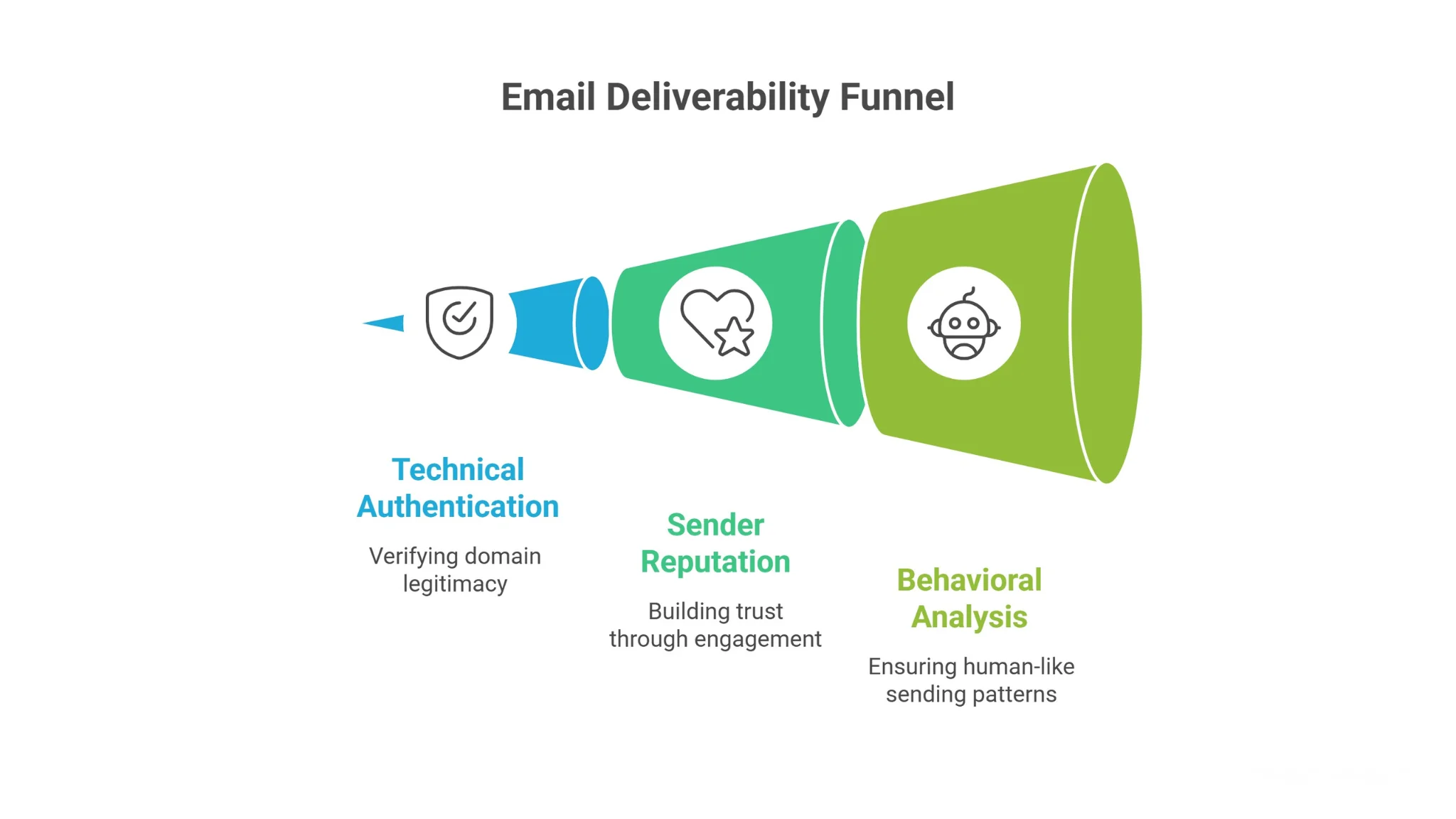
Before you fix spam issues, you need to understand what inbox providers are actually measuring.
Spam filters don’t judge your email based on one factor.
They score your technical setup, your sending history, and your behavior patterns together to decide whether your message lands in the inbox, promotions tab, or spam folder.
Technical Authentication (SPF, DKIM, DMARC)
The first checkpoint is authentication.
Inbox providers verify that your domain is legitimate using SPF, DKIM, and DMARC records.
If these aren’t configured properly, your emails look suspicious before anyone even reads the subject line.
SPF confirms that your server is allowed to send emails.
DKIM verifies the message wasn’t altered in transit.
DMARC tells providers how to handle authentication failures.
When these records are missing or misaligned, trust drops immediately even if your content is clean and well written.
Sender Reputation & Engagement Signals
Authentication proves you exist.
Reputation proves you behave well.
Inbox providers track bounce rates, spam complaints, unsubscribes, replies, and opens over time. High bounces or low engagement signal poor targeting or risky behavior.
If recipients ignore, delete, or mark your emails as spam, your domain trust declines.
On the other hand, genuine replies and positive engagement strengthen your sender reputation and improve future inbox placement.
Behavioral & Pattern Analysis
Even with perfect authentication and decent engagement, unnatural behavior can trigger filters.
Spam systems detect volume spikes, identical templates sent at scale, excessive links, and unusual sending times. If your outreach looks automated or robotic, filters respond defensively.
That’s why deliverability is not just technical.
It’s behavioral.
Your sending patterns must look human, gradual, and consistent, or your emails will struggle to reach the inbox.
Infrastructure Setup That Protects Email Deliverability
Now that you understand how filters score behavior, the next step is protecting your foundation.
Deliverability problems often begin long before you press send.
If your infrastructure is careless, even great targeting and clean copy won’t save you. A stable setup protects your brand, builds trust gradually, and gives you room to scale without risking your primary domain.
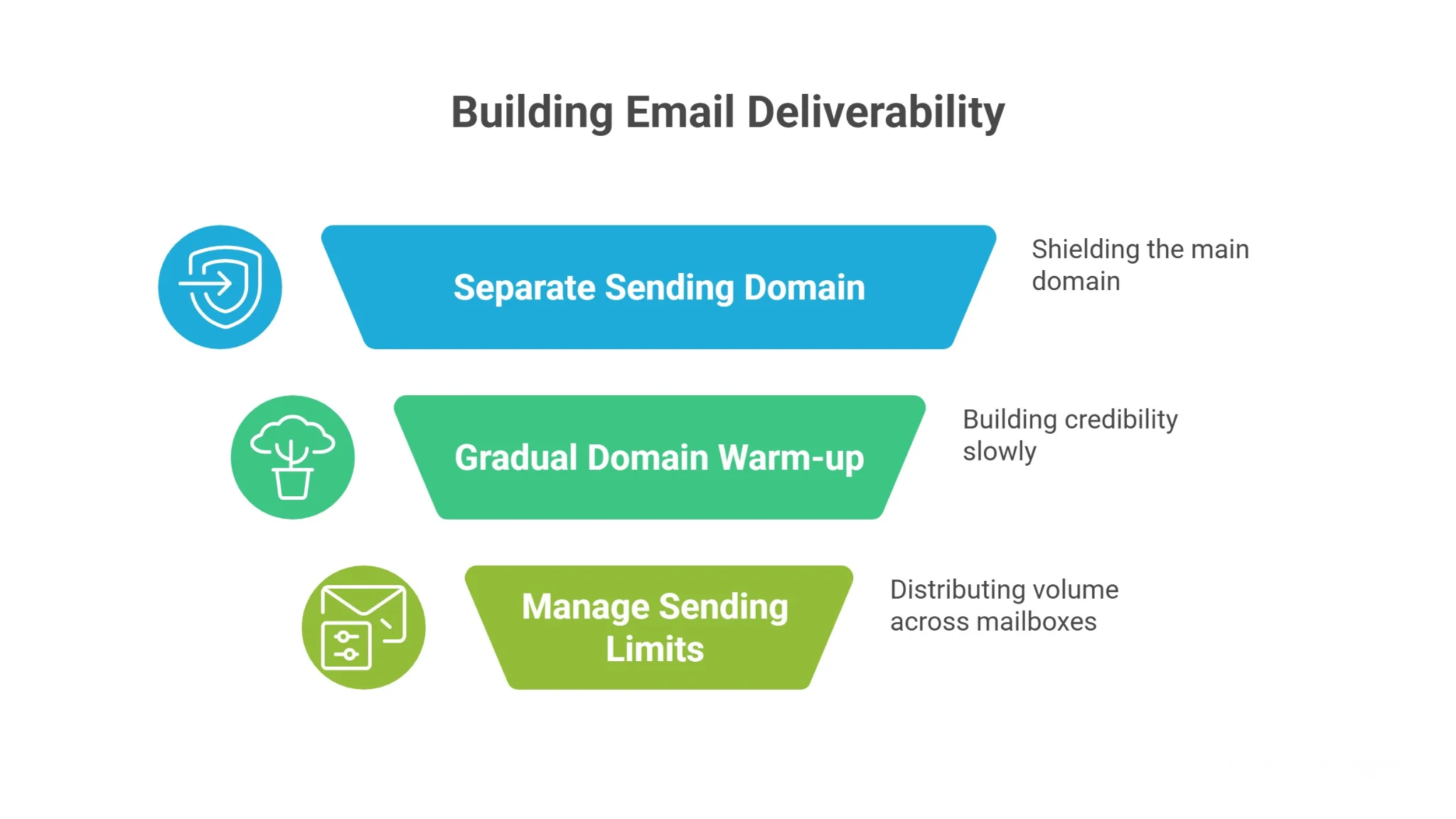
Use a Separate Sending Domain
You should never run cold email from your main website domain.
If your outreach triggers complaints or spam flags, your core business emails can suffer.
That means customer conversations, partnerships, and internal communication could all be affected.
Instead, use a secondary sending domain that closely matches your brand. This shields your primary domain while allowing you to build reputation safely.
If something goes wrong, your core operations stay protected.
Warm Up New Domains Gradually
New domains have no history.
And inbox providers don’t trust domains without history.
If you suddenly send 100 emails on day one, that spike looks suspicious. Warm-up builds credibility slowly by sending small volumes and increasing gradually over time.
Start with low daily sends.
Increase volume incrementally each week.
This steady growth mimics natural human behavior and allows engagement signals to build before scaling.
Manage Daily Sending Limits Per Mailbox
Each mailbox has safe limits.
Pushing too many emails from one inbox in a short period creates risk signals.
Instead of blasting from one account, distribute volume across multiple mailboxes. Keep daily sends conservative and spread them throughout business hours.
Consistency matters more than speed.
When your infrastructure is controlled and predictable, inbox providers reward you with stable placement and that stability compounds over time.
Building Clean Prospect Lists for Safe Cold Email Outreach
Even with perfect infrastructure, your results will collapse if your list is messy.
Spam filters don’t just judge how you send.
They judge who you send to.
High bounce rates, irrelevant targeting, and low engagement are strong negative signals. If the wrong people receive your emails, inbox providers assume your outreach is unwanted and your sender reputation suffers quickly.
That’s why list quality directly affects deliverability.
Define a Tight ICP Before Sending
If you try to email everyone, you’ll resonate with no one.
A clearly defined Ideal Customer Profile (ICP) helps you focus only on prospects who are likely to care about your message. This improves replies, reduces complaints, and strengthens long-term domain trust.
Define specifics like:
- Industry
- Company size
- Job title or decision-making authority
- Geography
- Buying signals or pain points
The tighter your targeting, the more relevant your outreach feels — and relevance drives positive engagement.
Verify Emails Before Activating Campaigns
Hard bounces are one of the fastest ways to damage your reputation.
If too many emails fail to deliver, providers assume you’re sending to scraped or outdated data. That lowers trust immediately and affects future inbox placement.
Before launching any campaign, verify your list.
Remove invalid, risky, or catch-all addresses.
Cleaner data means fewer bounces, stronger sender signals, and more stable deliverability over time.
Avoid Buying Mass Email Lists
Buying bulk lists may feel like a shortcut.
But it almost always leads to higher bounce rates, spam complaints, and poor engagement.
These contacts didn’t expect your message.
And unexpected messages get flagged.
Sustainable cold email outreach isn’t about volume blasting.
It’s about precision.
When your list is clean, verified, and tightly aligned with your ICP, your outreach becomes safer and far more effective.
Writing Cold Emails That Avoid Spam Filters
Infrastructure and list quality set the stage.
But your email content still influences how filters score your message.
Spam systems analyze formatting, wording, structure, and link patterns. If your email looks overly promotional or mechanically generated, it increases risk signals even if everything else is set up correctly.
The goal is simple.
Your email should look like a normal business conversation between two professionals.
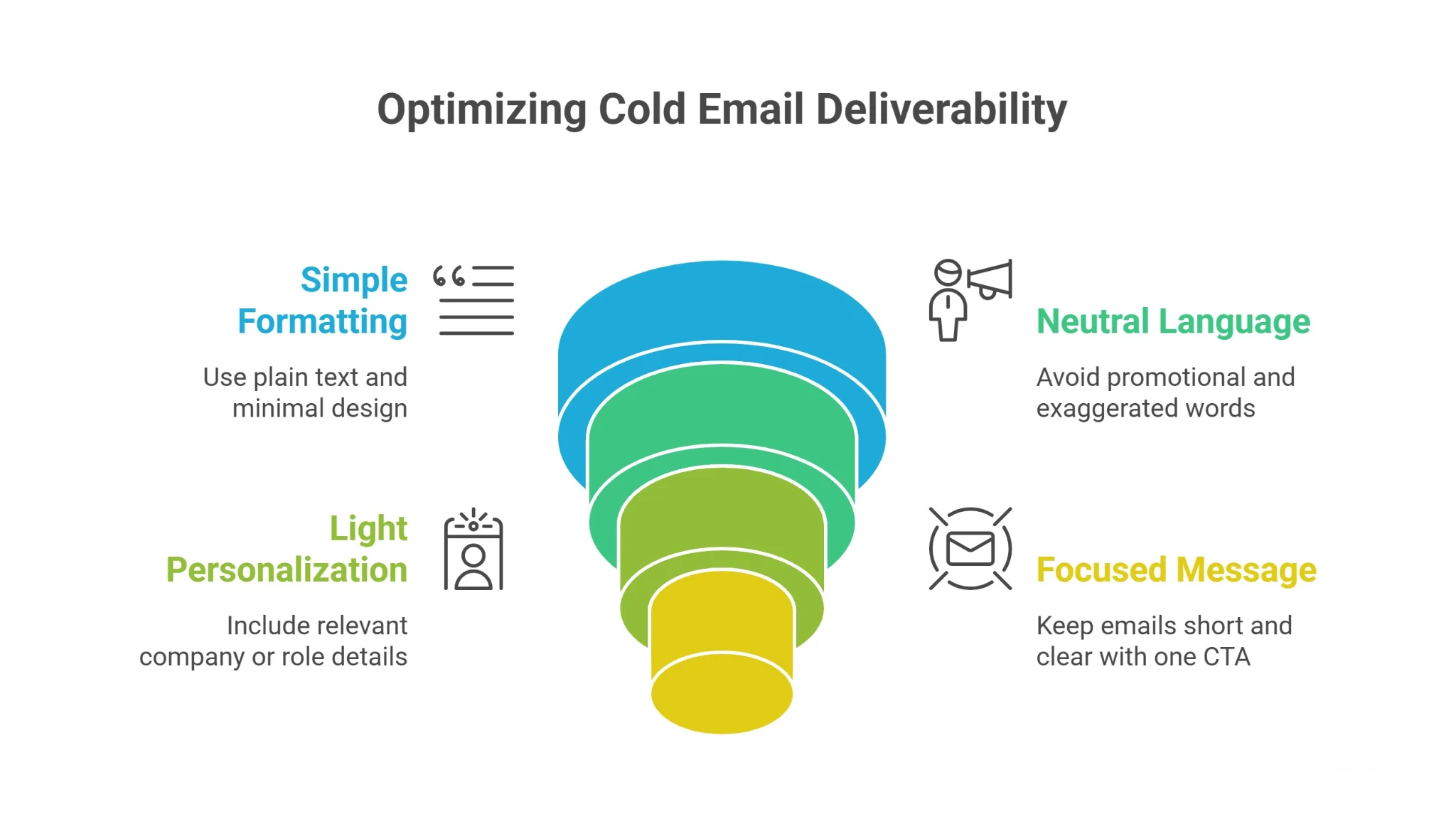
Keep Formatting Simple and Plain
Cold emails are not landing pages.
Heavy HTML design, banners, multiple images, tracking-heavy templates, and flashy formatting often trigger spam filters. Plain-text or lightly formatted emails look natural and blend in with everyday communication.
Avoid:
- Multiple colored fonts
- Large images
- Excessive bolding
- Too many hyperlinks
One or two simple paragraphs with natural spacing works best.
If it looks like something you’d personally send from your inbox, you’re on the right track.
Avoid Spam Trigger Language
Certain words immediately raise suspicion.
Over-promotional phrases like “guaranteed results,” “limited time offer,” “act now,” or exaggerated income claims are classic spam markers. Even if your offer is legitimate, hype language reduces trust.
Instead, use neutral, professional wording.
Speak clearly about the problem you solve and the outcome you help create.
Confidence works better than exaggeration.
When your tone feels calm and conversational, filters and recipients respond more positively.
Use Light Personalization Only
Personalization improves engagement.
But overdoing it can backfire.
Injecting scraped data points, awkward references, or overly detailed observations makes emails feel automated and invasive. That reduces replies and increases spam complaints.
Stick to relevant personalization.
Mention the company, role, or a clear reason for reaching out. Keep it simple and genuine.
If it sounds forced, it probably is.
Keep Emails Short and Focused
Long emails increase cognitive load.
Short emails increase replies.
Focus on one clear idea, one value point, and one simple question. Avoid multiple CTAs, long explanations, or stacked paragraphs.
When your message is easy to read and easy to respond to, engagement improves.
And higher engagement strengthens your deliverability over time.
Sending Behavior That Keeps Cold Email Outreach Out of Spam
Even with clean lists and strong copy, poor sending behavior can destroy your deliverability.
Spam filters pay close attention to patterns.
If your activity looks automated, aggressive, or unnatural, inbox providers respond defensively, no matter how good your offer is.
That’s why discipline matters just as much as strategy.
Space Emails Throughout the Day
Sending 50 emails in five minutes is a red flag.
Real humans don’t behave that way.
Instead of batch blasting, distribute your emails across normal business hours. Stagger sends with natural gaps between each message to mimic real user behavior.
This reduces automation signals and keeps your activity looking organic.
Consistency beats bursts.
Slow and steady sending patterns build long-term trust with inbox providers.
Limit Follow-Ups to Controlled Sequences
Follow-ups improve response rates.
But too many follow-ups increase irritation and spam complaints.
Stick to a controlled sequence of two to three follow-ups spaced several days apart. Each message should add value or context, not just repeat the same ask.
If someone doesn’t respond after multiple touches, step back.
Protecting your sender reputation is more important than chasing one unresponsive lead.
Track Negative Replies and Complaints
Negative signals are early warnings.
Replies like “not interested,” unsubscribe requests, and spam complaints tell you something is off either your targeting, messaging, or volume.
Monitor these carefully.
If negative feedback rises, pause and diagnose before continuing to scale.
Deliverability is not just about sending more emails.
It’s about listening to how recipients respond — and adjusting before reputation damage compounds.
Using Oppora.ai to Structure Cold Email Outreach Safely
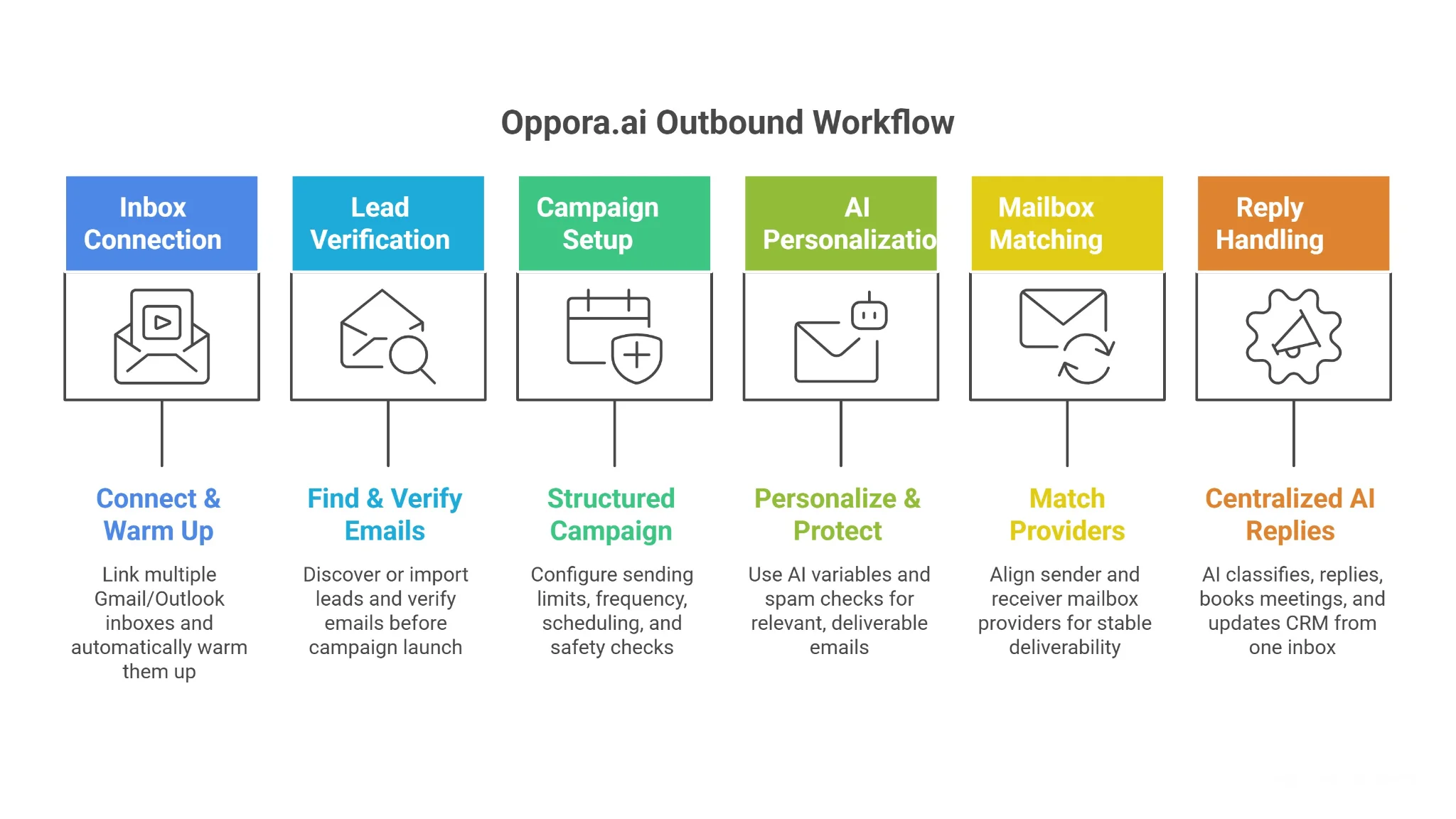
Scaling outbound shouldn’t mean risking your domains.
When inboxes, verification, sending limits, personalization, and replies are managed across scattered tools, mistakes happen burned domains, spam complaints, missed replies, and inconsistent follow-ups.
Oppora structures the entire outbound workflow inside one controlled system so you can scale safely, predictably, and without operational chaos.
Connect & Warm Up Multiple Inboxes
Start by connecting multiple Gmail or Outlook inboxes to distribute sending volume safely.
Oppora automatically warms up new inboxes before campaigns begin gradually building sender reputation through controlled activity.
This prevents sudden sending spikes that trigger spam filters and protects long-term domain health as you scale.
Find & Verify Emails Before Activation
Before any campaign launches, every lead can be verified inside Oppora.
You can:
- Find emails directly through Oppora’s lead discovery system
- Or verify manually imported lists
- Run standard or advanced (SMTP-level) verification
By filtering out invalid or risky emails upfront, you reduce bounce rates, protect sender reputation, and avoid unnecessary spam complaints.
Structured Campaign Setup With Built-In Safety Controls
Campaigns aren’t just “send and hope.”
Oppora lets you configure:
- Daily sending limits per mailbox
- Frequency control between emails
- Scheduled sending windows
- Follow-up timing
- Safety checks before launch
This structured setup prevents accidental volume spikes and ensures each inbox operates within healthy limits.
AI Personalization With Spam Protection
Personalization improves replies but poor personalization increases spam risk.
Oppora allows dynamic AI variables like:
- {{company name}}
- {{revenue}}
- {{job title}}
- Custom AI-generated first lines
At the same time, your email body is checked for spam-trigger phrases and risky wording before sending.
You get relevance without sacrificing deliverability.
Mailbox Provider Matching for Higher Deliverability
Inbox providers favor familiarity.
Oppora automatically matches:
- Gmail → Gmail
- Outlook → Outlook
By aligning sender and receiver mailbox providers, campaigns maintain more stable deliverability patterns and improve inbox placement consistency.
Centralized AI Reply Handling & Meeting Booking
Replies are where revenue happens — and where most teams lose opportunities.
Oppora’s AI Reply Agent:
- Reads incoming responses
- Classifies intent (Interested, Not Interested, Question, etc.)
- Sends contextual replies automatically
- Books meetings via calendar integration
- Updates CRM status
Everything is handled inside one centralized inbox so no lead gets missed and no duplicate follow-ups occur.
Conclusion
Cold email outreach stays out of spam when you treat deliverability like a system, not a shortcut.
Strong infrastructure, verified lists, clean writing, and disciplined sending patterns build trust over time. When you protect your domains and prioritize engagement signals, inbox placement becomes predictable instead of stressful.
And if managing inboxes, warm-up, verification, sending limits, and replies across multiple tools feels overwhelming, that’s where a structured system helps.
With a platform like Oppora, you can scale outbound safely without burning domains or losing control of your deliverability.
Frequently Asked Questions (FAQs)
How long does it take to build a strong sender reputation?
Sender reputation builds gradually. If you warm up properly and maintain healthy engagement, you can see stability within 3–4 weeks. Rushing volume too early delays progress and increases spam risk. Consistency matters more than speed.
Does cold email deliverability differ between Gmail and Outlook?
Yes. Each provider uses slightly different filtering algorithms and engagement signals. Gmail is heavily engagement-driven, while Outlook can be stricter on technical setup. Monitoring performance by provider helps you adjust volume and behavior accordingly.
Should I use tracking pixels in cold emails?
Tracking pixels can reduce deliverability because some filters detect hidden tracking elements. If deliverability is your priority, minimize tracking-heavy setups. Focus more on replies than open rates, since replies strengthen your sender reputation more effectively.
What is an acceptable bounce rate for cold email campaigns?
Ideally, keep hard bounce rates under 2%. Anything higher signals poor list hygiene and can damage your domain reputation. Regular verification and list cleaning are essential to maintaining stable inbox placement.
How often should I rotate or replace sending domains?
You shouldn’t rotate domains frequently unless your reputation is damaged. Constant switching looks suspicious. Instead, maintain healthy sending practices, monitor engagement, and scale responsibly so your domain builds long-term trust rather than short-term workarounds.