15 Cold Email Templates for Digital Marketing Services That Get 3x Replies
cold email to sell marketing services digital marketing outreach email digital marketing services cold email template cold outreach email template marketing services email cold email for lead generation services B2B cold email for services cold email
Cold email still works but only when it’s done right.
Most outreach fails because messages feel generic, rushed, or overly salesy.
This guide shares 15 proven cold email templates built for digital marketing services. You’ll learn why campaigns get ignored and what actually encourages replies.
Instead of pushing offers, these examples focus on starting conversations, building context, and earning responses.
Whether you’re reaching out for the first time or following up, this guide helps you write emails people are more likely to read and reply to.
What Makes a Cold Email Get Replies
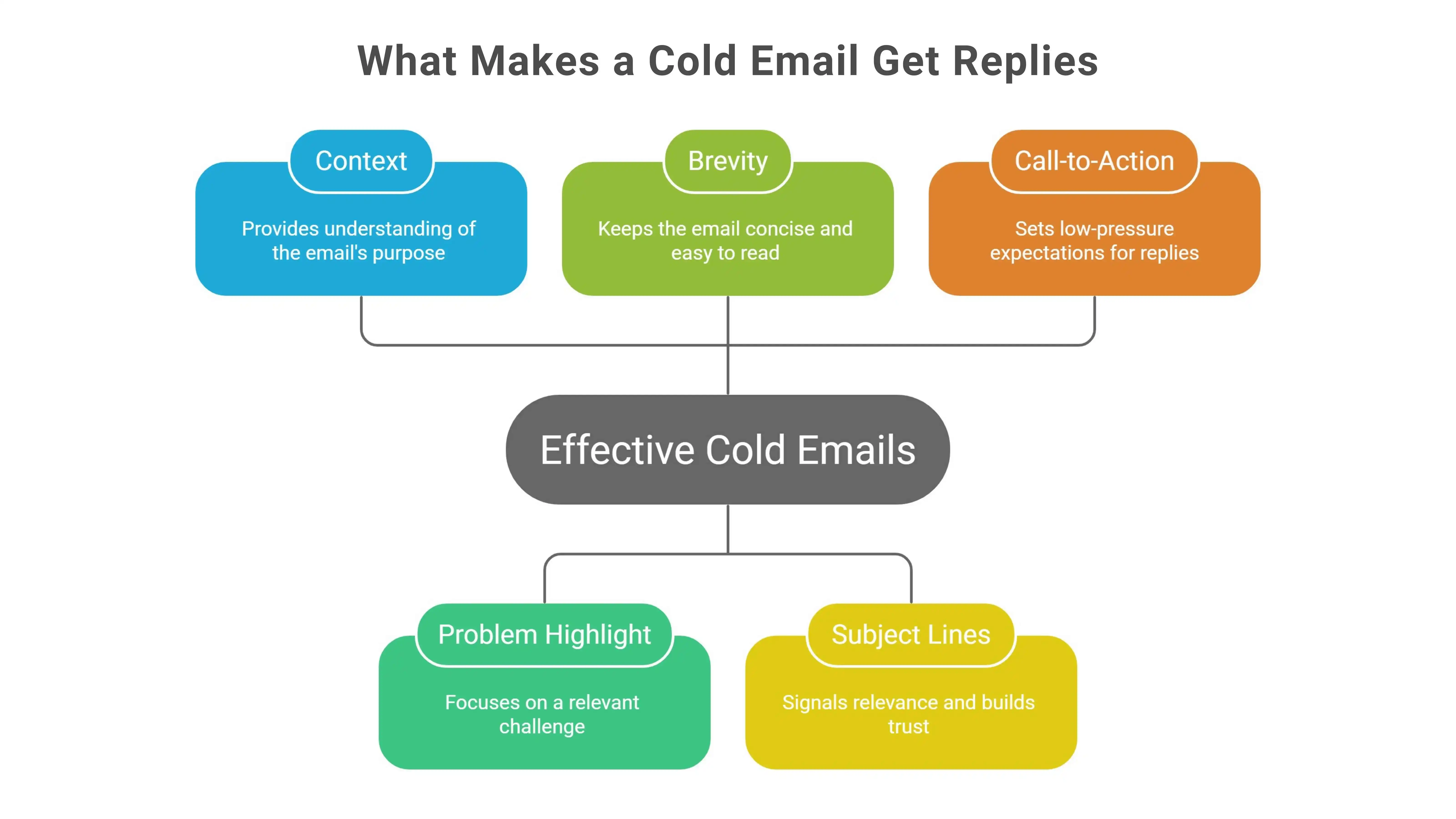
Cold emails get replies when they respect the reader’s time and feel relevant. People don’t ignore messages because they hate email. They ignore messages that don’t feel meant for them.
A good outreach email doesn’t try to sell immediately. It tries to connect. It provides enough context to be understood, enough relevance to feel worth replying to, and enough restraint to avoid pressure.
The sections below outline the principles that consistently turn cold outreach email into conversations instead of sales pitches.
Lead With Context, Not a Pitch
People reply when they understand why you’re reaching out.
A digital marketing outreach email that jumps straight into services or results feels abrupt. There’s no frame of reference, and the reader has to guess why they’re receiving the message.
Context removes friction by answering simple questions upfront why now, why them, and why this message. When a cold email starts with clear intent instead of an offer, it feels more human and easier to engage with.
Highlight a Problem, Not a Full Solution
Effective outreach emails don’t explain everything. They point to something familiar.
When messaging immediately dives into solutions, it creates overload. Referencing a relevant challenge shows awareness without assumptions. In B2B cold email for services, this approach invites reflection instead of resistance and that’s how curiosity starts.
Keep the Email Short and Focused
Short cold emails are easier to read and easier to reply to.
Long explanations, multiple ideas, or detailed workflows make messages feel heavy. A focused outreach email has one clear reason for reaching out and one clear direction. Removing unnecessary detail strengthens clarity rather than weakening the message.
Use Subject Lines That Signal Relevance
Subject lines shape expectations before a cold email is opened.
Generic or promotional subject lines create resistance. A strong outreach email subject line hints at relevance without exaggeration. When it accurately reflects what’s inside the message, trust increases and opens feel justified.
Set Low-Pressure Call-to-Action Expectations
Replies increase when the ask feels reasonable.
Instead of pushing for a meeting or call in the first cold email, low-pressure next steps work better a simple reply, confirmation, or clarification. In a digital marketing outreach email, this reduces friction and lets conversations progress naturally.
15 Cold Email Templates for Digital Marketing Services
Templates work best when they’re used with intention.The goal isn’t to copy and paste. It’s to choose the right message for the right moment.
Below are 15 standalone templates designed for common outreach situations in digital marketing. Each one focuses on clarity, relevance, and ease of reply.
Think of these as flexible starting points, not rigid scripts. When used well, a digital marketing services cold email template should feel personal, timely, and natural to the person reading it.
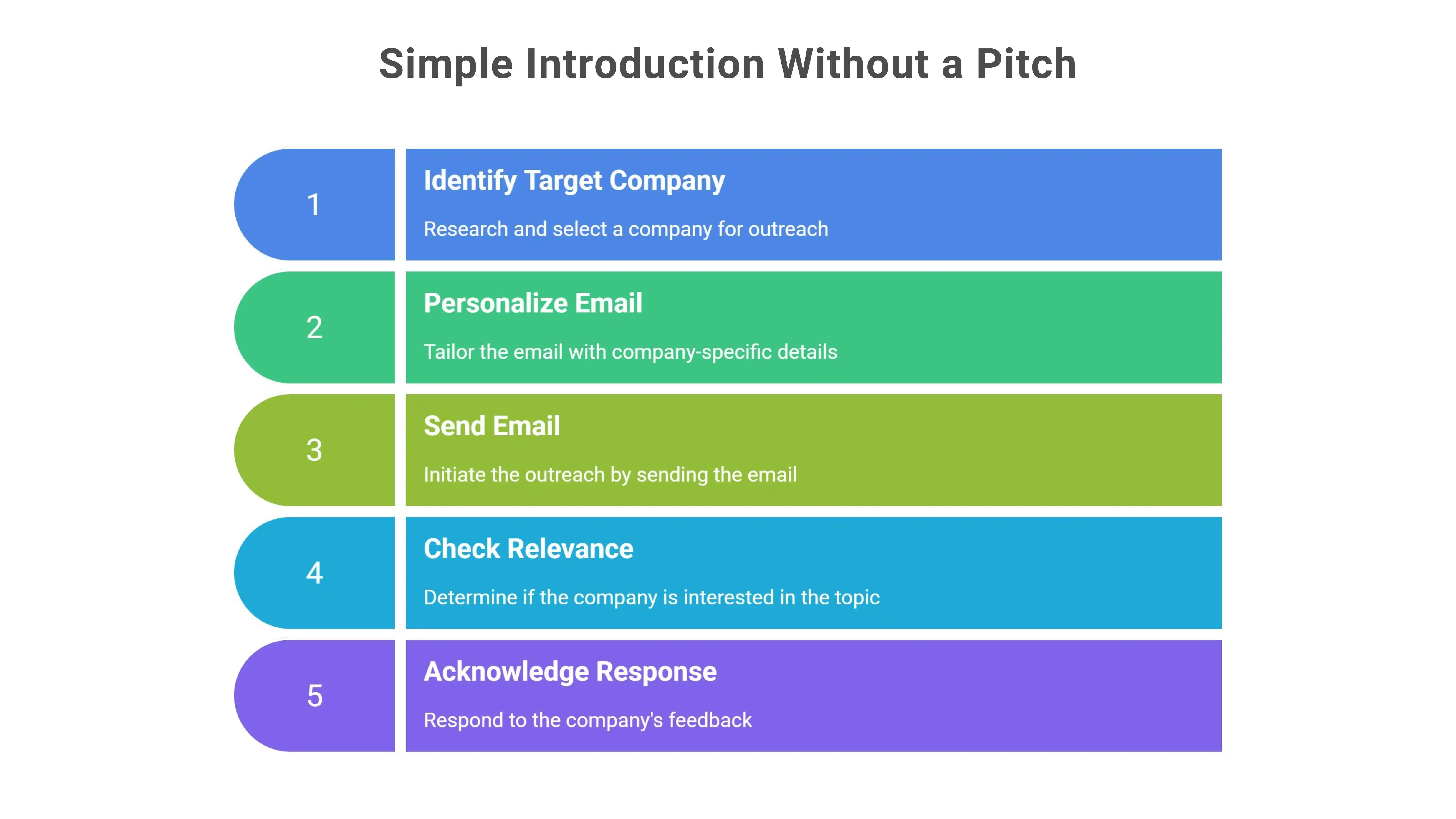
Template 1 – Simple Introduction Without a Pitch
When It Works Best
Works well for first-touch outreach when the goal is to check relevance before any sales discussion.
Customization Best Practices
- Personalize one line using the company, role, or industry
- Keep the rest of the message neutral and low-pressure
Email Template
Subject: Quick question
Hi {{Name}},
I came across {{Company Name}} while reviewing teams in {{industry}}.
This note isn’t about selling anything. I’m interested in how you currently think about {{specific area}}.
If it’s not something you’re focused on right now, that’s completely fine.No action needed.
Kind regards, {{Your Name}}
Pro Tips
- Keep the email under 90 words
- Avoid links in the first message
- Don’t include a meeting request
Template 2 – Noticed-Something-Specific Outreach
When It Works Best
Best suited for situations where you’ve noticed a relevant change, update, or signal and want to acknowledge it without drawing too much attention to your research.
Customization Best Practices
- Reference only one specific observation
- Keep the note neutral and factual, not flattering or critical
Email template
Subject: Quick note about {{specific observation}}
Hi {{Name}},
I noticed {{specific observation}} at {{Company Name}} recently.
Not reaching out with a pitch.Just wanted to understand how you’re thinking about {{related area}} at the moment.
If this isn’t relevant right now, no problem at all.Happy to leave it there.
Regards, {{Your Name}}
Pro Tips
- Stick to one observation only
- Avoid links, screenshots, or deep analysis
- Keep the tone curious, not evaluative
Template 3 – Soft Problem Awareness Email
When It Works Best
Most effective when you want to introduce a common industry challenge in a non-assumptive way and invite reflection rather than agreement or action.
Customization Best Practices
- Mention a broadly relevant challenge in their space
- Avoid implying urgency or need for change
Email template
Subject: Quick question about {{general challenge}}
Hi {{Name}},
I’ve been speaking with a few teams in {{industry}} lately, and {{general challenge}} has come up often.
Not suggesting this is something you’re dealing with.Just curious how this is showing up, if at all, on your side.
If it’s not relevant, no worries at all.Thought I’d ask.
Best, {{Your Name}}
Pro Tips
- Keep the challenge general, not diagnostic
- Avoid words like “fix,” “solve,” or “improve”
- Let curiosity drive the reply, not urgency
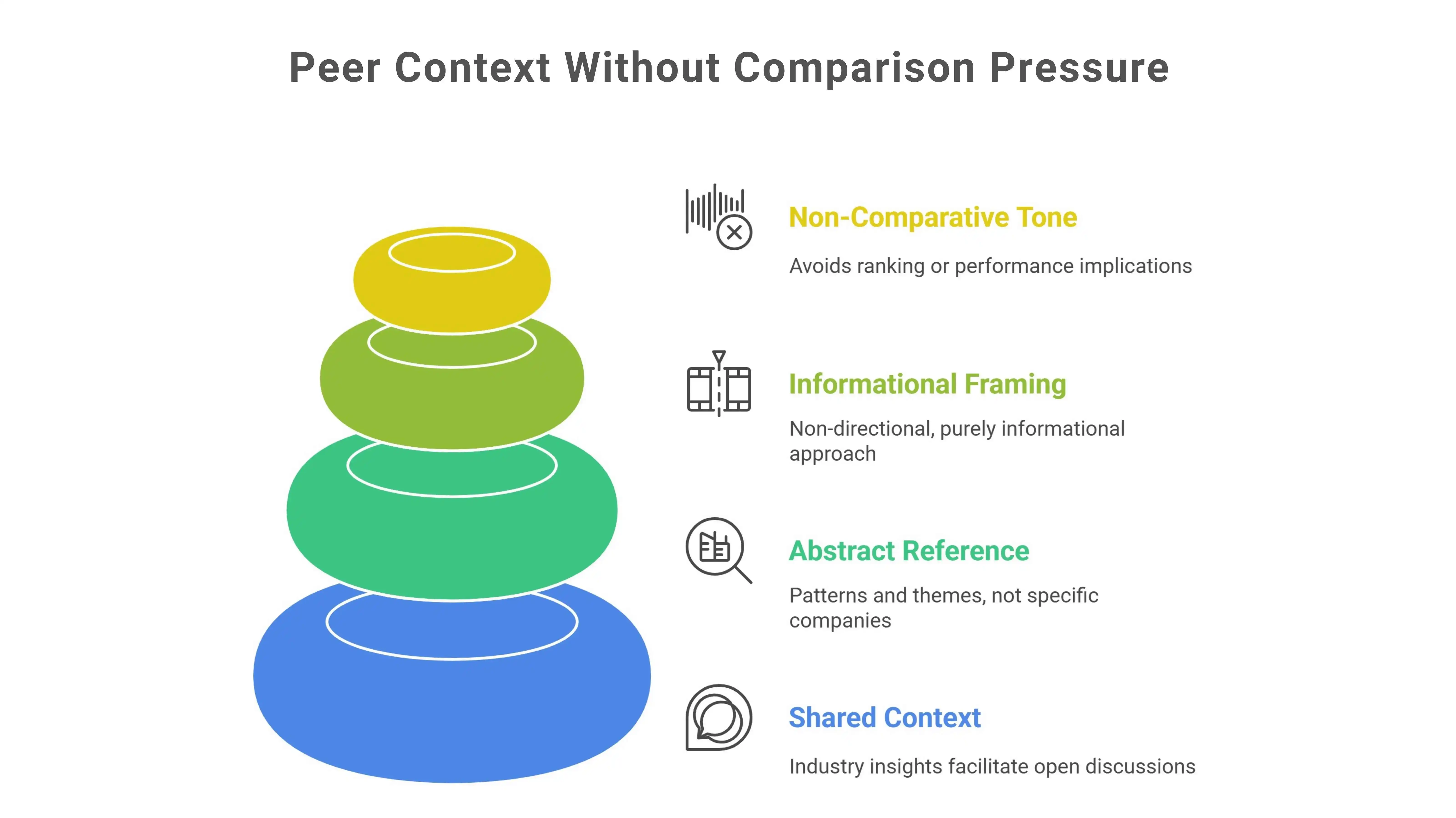
Template 4 – Peer Context Without Comparison Pressure
When It Works Best
Fits situations where shared industry context helps open dialogue, without positioning other teams as reference points or benchmarks.
Customization Best Practices
- Refer to patterns or themes, not specific companies
- Keep the framing informational, not directional
Email template
Subject: A quick thought on {{area}}
Hi {{Name}},
In recent discussions with teams across {{industry}}, {{area}} has come up more than once.
There’s no comparison implied here. I was interested in whether this topic is on your radar at all.
If now isn’t the right time, feel free to ignore this note.Appreciate you taking a moment to read.
Warm regards, {{Your Name}}
Pro Tips
- Avoid phrases that imply ranking or performance
- Keep the peer reference abstract, not concrete
- Let the context stand on its own
Template 5 – Content or Insight Share
When It Works Best
Most effective when you have a relevant insight, article, or data point that may be useful to the reader without expecting a reply or next step.
Customization Best Practices
- Share one specific insight or resource, not a collection
- Frame it as optional reading, not a recommendation
Email template
Subject: Sharing something you might find useful
Hi {{Name}},
I came across a short piece on {{topic/insight}} and thought it might be relevant given {{light context}}.
No follow-up or action expected.Just passing it along in case it’s helpful.
If you do take a look, I’d be interested in your perspective whenever convenient.
All the best, {{Your Name}}
Pro Tips
- Keep the insight genuinely useful, not promotional
- Avoid attaching files; links are fine if clearly optional
- Don’t frame the share as advice or guidance
Template 6 – Asking for the Right Contact
When It Works Best
Useful when you’ve reached a general inbox or contact and need help identifying who oversees marketing decisions.
Customization Best Practices
- Keep the request limited to identifying the right person
- Avoid adding context about services or outcomes
Email template
Subject: Quick check on the right contact
Hi {{Name}},
I’m trying to make sure I’m reaching the appropriate person for marketing-related topics at {{Company Name}}.
Would you be able to point me in the right direction, or let me know if someone else handles this?
Appreciate your help.
With thanks, {{Your Name}}
Pro Tips
- Keep the message under 70 words
- Don’t include links or explanations
- Avoid asking follow-up questions in the same email
Template 7 – Short Polite Follow-Up
When It Works Best
Appropriate when an earlier message hasn’t received a response, but the topic still feels relevant and worth revisiting lightly.
Customization Best Practices
- Refer to the earlier message indirectly, without restating it
- Keep the follow-up neutral and brief
Email template
Subject: Following up on my earlier note
Hi {{Name}},
I wanted to circle back on a message I shared recently in case it was missed.
There’s no urgency on this. Just checking whether the topic is something you’d like to revisit.
If now isn’t a good time, feel free to ignore this note.
Respectfully, {{Your Name}}
Pro Tips
- Wait at least 4–5 business days before sending
- Keep the follow-up shorter than the original email
- Avoid introducing new information in this message
Template 8 – Relevance-Based Follow-Up
When It Works Best
Effective when something has changed—such as timing, activity, or context—that makes revisiting the conversation feel natural rather than repetitive.
Customization Best Practices
- Reference one clear trigger or change
- Keep the message grounded in timing, not persuasion
Email template
Subject: Noting a recent update
Hi {{Name}},
I noticed a recent change around {{timing trigger or update}} and thought it might be worth reconnecting briefly.
No assumptions on priority here.Just wanted to acknowledge the shift and see if it changes anything on your side.
If it’s not relevant right now, no response is needed.
Appreciatively, {{Your Name}}
Pro Tips
- Mention only one timing trigger
- Avoid framing the update as an opportunity
- Keep the follow-up concise and factual
Template 9 – Audit or Review Offer
When It Works Best
Most appropriate when you want to offer an objective review or second look, framed as insight-sharing rather than a service pitch.
Customization Best Practices
- Define the scope of the review clearly and narrowly
- Emphasize observations, not recommendations
Email template
Subject: Offering a brief outside perspective
Hi {{Name}},
I occasionally review {{specific area}} for teams to surface patterns or gaps they may not have noticed internally.
There’s no obligation or follow-up tied to this. The intent is simply to share a few neutral observations, if that’s useful.
If it’s not something you’d like to explore, no problem at all.
Best wishes, {{Your Name}}
Pro Tips
- Keep the review framed as optional insight
- Avoid attaching reports or decks upfront
- Don’t position the audit as a “fix”
Template 10 – Direct Ask for a Quick Call
When It Works Best
Appropriate when relevance has already been established and it feels reasonable to ask for a brief, focused conversation.
Customization Best Practices
- Keep the time request specific and short
- Make declining feel as acceptable as agreeing
Email template
Subject: Open to a brief call?
Hi {{Name}},
Based on our earlier context, I wondered if a short conversation might be useful.
I’m thinking 10–15 minutes, purely to exchange perspectives and see if there’s any alignment. If that doesn’t make sense right now, feel free to say no or suggest another time.
Either way is completely fine.
Thanks, {{Your Name}}
Pro Tips
- Always include a clear time range
- Avoid calendar links in the first ask
- Don’t follow up on a call request too quickly
Template 11 – Referral-Style Outreach
When It Works Best
Most effective when you want to open a conversation using light social context—without claiming a referral or implying a prior relationship.
Customization Best Practices
- Mention a shared theme, event, or network indirectly
- Avoid naming individuals unless you have permission
Email template
Subject: A quick introduction by context
Hi {{Name}},
Your name came up while I was speaking with others in {{shared space or context}}.
There’s no assumed connection here. I simply thought it made sense to introduce myself and see if this topic is relevant on your side.
If not, completely understandable.
Warmly, {{Your Name}}
Pro Tips
- Keep the connection implied, not explicit
- Avoid phrases like “they suggested I reach out”
- Let the familiarity feel natural, not constructed
Template 12 – Reconnecting With Past Conversations
When It Works Best
Most effective when there has been light interaction in the past and it feels appropriate to reopen the conversation without assuming interest or momentum.
Customization Best Practices
- Reference the past interaction briefly and neutrally
- Avoid implying anything was left unfinished
Email template
Subject: Picking up an earlier thread
Hi {{Name}},
We exchanged a quick note some time ago, and I wanted to reconnect in case the topic is more relevant now.
There’s no expectation attached to this. Just checking whether it makes sense to revisit the conversation at this point.
If not, that’s completely fine.
Sincerely, {{Your Name}}
Pro Tips
- Keep the reference to the past vague and non-specific
- Don’t apologize for the gap in communication
- Let the reader decide whether to continue
Template 13 – Feedback-Driven Outreach
When It Works Best
Most effective when you want perspective or insight from someone experienced, without framing the outreach around services or outcomes.
Customization Best Practices
- Ask for opinion, not validation
- Keep the question open-ended and optional
Email template
Subject: A quick perspective request
Hi {{Name}},
I’m gathering a few outside viewpoints on {{topic or area}} and thought your perspective could be valuable.
There’s no agenda behind this. I’m simply interested in how you see this evolving or what stands out from your experience.
If it’s not something you have time for, that’s completely fine.
Many thanks, {{Your Name}}
Pro Tips
- Ask only one clear question
- Avoid framing feedback as a “favor”
- Don’t steer the response toward your solution
Template 14 – Trend or Event-Based Outreach
When It Works Best
Most effective when an industry shift, announcement, or event creates a natural reason to reach out without forcing continuity.
Customization Best Practices
- Reference one clear trend or event only
- Keep the timing connection factual, not speculative
Email template
Subject: A thought following {{event or trend}}
Hi {{Name}},
With {{event or trend}} coming up recently, I’ve seen a lot of discussion around {{related topic}}.
No assumptions attached here.I was simply curious whether this development has changed any priorities on your end.
If it’s not something you’re tracking closely, feel free to disregard this note.
Kindly, {{Your Name}}
Pro Tips
- Avoid predicting outcomes or impacts
- Don’t frame the trend as an opportunity
- Let relevance come from timing, not persuasion
Template 15 – Closing the Loop Email
When It Works Best
Most effective when a conversation has gone quiet and you want to close the loop cleanly without nudging for action or response.
Customization Best Practices
- Keep the close neutral and final, not suggestive
- Avoid reopening topics or adding new context
Email template
Subject: Closing the loop
Hi {{Name}},
I wanted to wrap up this thread so it doesn’t linger in your inbox.
If this isn’t something you’re planning to explore, there’s nothing further needed on your side.I’ll step back unless the timing changes later on.
Wishing you well.
With appreciation, {{Your Name}}
Pro Tips
- Send this only once per thread
- Avoid follow-ups after a loop-closing email
- Keep the tone calm and conclusive
Automate End-to-End Cold Email Outreach With Oppora
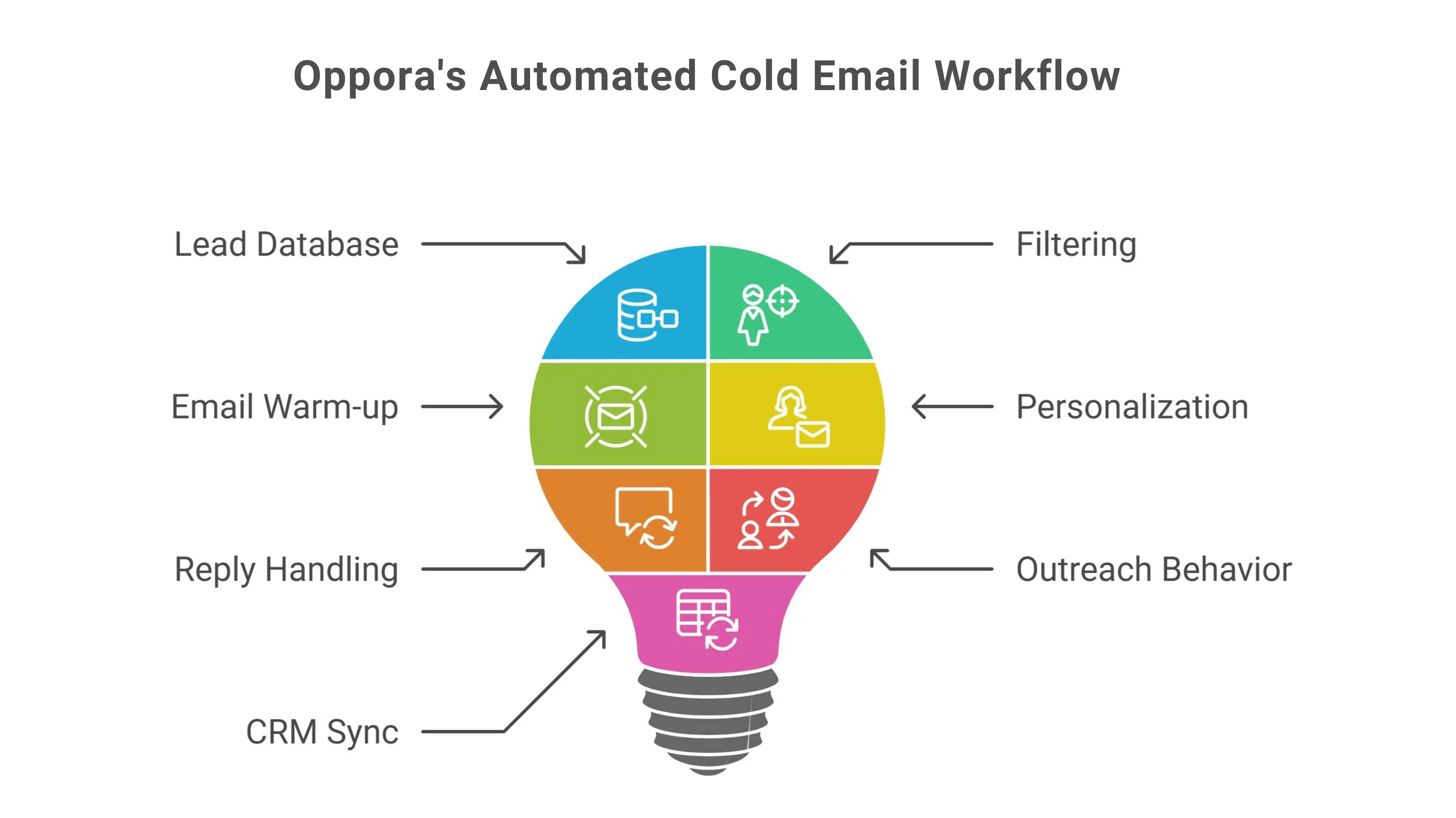
Most cold email tools still depend on daily manual effort. Teams need to log in, search for leads, build lists, monitor deliverability, and respond to replies just to keep outreach running. As volume increases, this routine becomes difficult to maintain consistently.
Oppora takes a different approach by allowing teams to set up a complete outreach workflow once and let it run continuously in the background using AI.
Instead of managing each step separately, outreach is handled as a connected system where lead discovery, filtering, sending, and reply handling work together without requiring daily intervention.
Oppora supports this end-to-end flow by combining multiple outreach activities into a single workflow:
- Access to a large, continuously updated lead database, removing the need for repeated manual sourcing
- Buying-signal and intent-based filters that help narrow outreach to more relevant prospects
- Automated email warm-up that runs in the background to protect sender reputation
- AI-driven personalization that adapts message content based on lead context and data
- Automatic handling and categorization of incoming replies to avoid missed or delayed responses
- Outreach behavior aligned with each lead’s email provider to maintain consistency and deliverability
- Seamless syncing of outreach activity with Oppora’s built-in CRM or external CRMs like HubSpot, Salesforce, Zoho, or Pipedrive
Because these elements operate within a single workflow, outreach continues even when teams are not actively logged in. Conversations stay organized, leads don’t go cold due to delays, and context is preserved across every interaction.
This approach allows teams to scale cold email outreach steadily while keeping the process structured, controlled, and easier to manage over time without turning outreach into a daily operational burden.
Conclusion
Connecting through email works best when it feels intentional, not transactional.Strong outreach focuses on clear context, respectful timing, and messages that invite conversation instead of pushing outcomes.
These templates are frameworks, not scripts.
When adapted thoughtfully, a cold email template for digital marketing services helps restart dialogue, maintain consistency, and reduce effort as outreach volume increases.
As outreach scales, structure matters.Sequencing, replies, and context should stay connected so conversations don’t feel fragmented or rushed.
Tools built for end-to-end outreach like Oppora.ai can support this process quietly, without adding noise or complexity.
Start small.Review what’s working.Make incremental improvements that keep conversations moving naturally.
Frequently Asked Questions (FAQs)
How many cold emails should I send before stopping outreach?
There’s no fixed rule, but 2–3 well-spaced emails is usually enough. If there’s no response after that, it’s better to pause rather than continue following up.
Should I use the same template for different industries?
The structure can stay the same, but wording and context should change. Industry-specific references help emails feel relevant instead of generic.
Is it okay to reuse templates across campaigns?
Yes, as long as you adjust timing, context, and personalization. Reusing templates without adapting them often reduces reply rates.
How important is personalization in cold emails?
Personalization matters, but it doesn’t need to be deep. One relevant line is often enough to show intent without making the email feel intrusive.
Should I include links in my first cold email?
It’s usually better to avoid links initially. Link-free emails feel lighter and make it easier for recipients to reply without friction.