15 Email Deliverability Best Practices to Boost Inbox Rates 35%
email deliverability best practices best practices for email deliverability best practices for improving email deliverability
Your emails can be perfectly written and still never reach the inbox.
That’s the harsh reality of modern outreach.
Inbox placement determines whether your campaigns generate revenue or quietly disappear into spam folders. And that difference often has nothing to do with your copy it comes down to infrastructure, reputation, and engagement signals.
When you understand and apply the right email deliverability best practices, you stop guessing.
You start building predictable inbox placement instead of relying on risky volume spikes or short-term hacks.
In this guide, you’ll learn what actually influences deliverability and how to strengthen it step by step.
How Email Deliverability Actually Works Behind the Scenes
Before you improve deliverability, you need to understand what actually happens after you hit send.
Mailbox providers like Gmail and Outlook don’t simply forward your message to the inbox. They evaluate your domain, your infrastructure, and how recipients have reacted to your emails in the past.
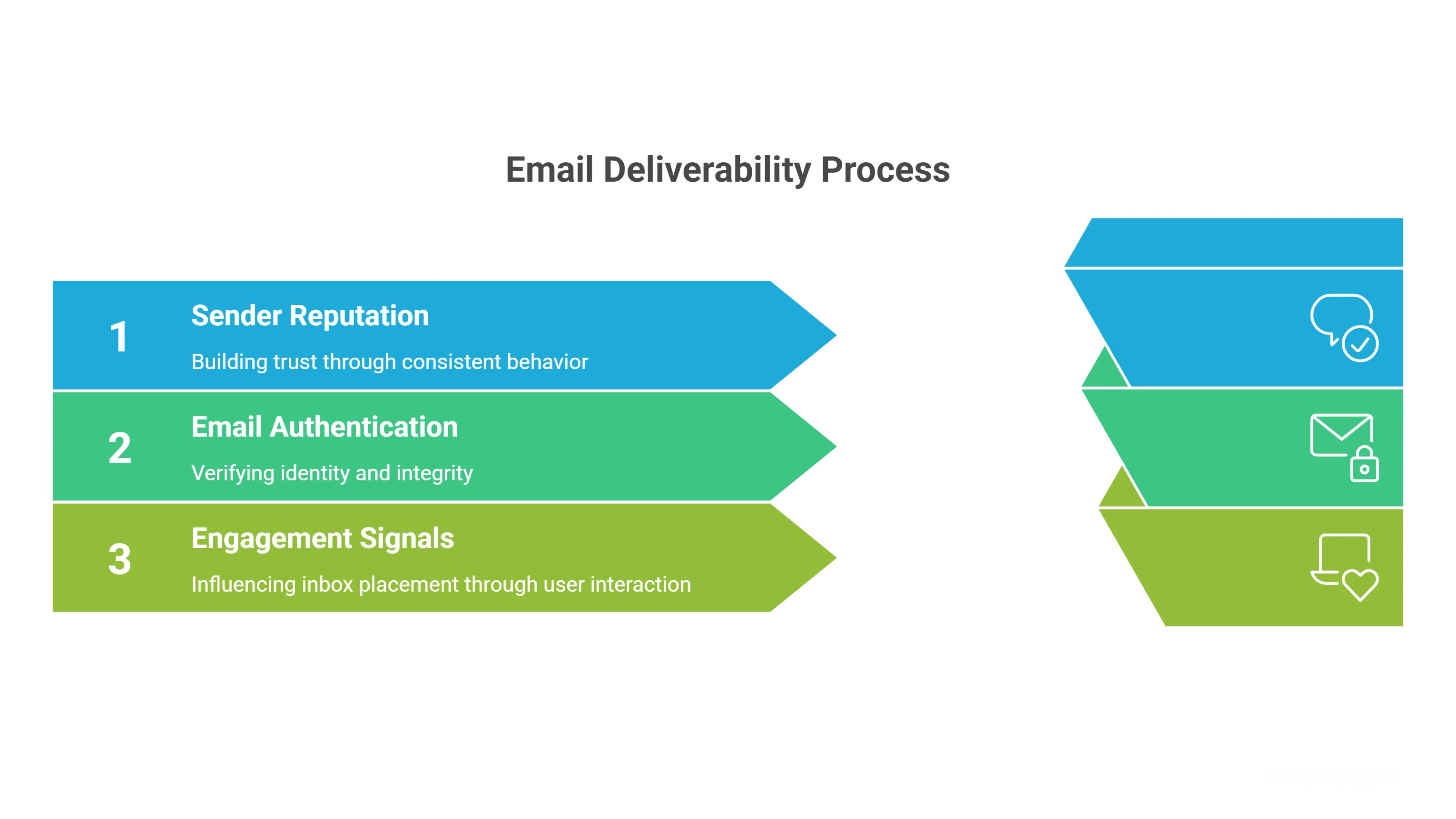
Let’s break down the three core systems that decide your inbox placement.
Sender Reputation & Domain Trust
Think of sender reputation as your email credit score.
Every domain and sending IP builds a history over time. Mailbox providers track bounce rates, spam complaints, sending consistency, and sudden volume spikes.
If your emails are ignored, marked as spam, or sent to invalid addresses, your reputation drops.
If recipients open, reply, and move your emails out of promotions, your trust score increases.
Once your reputation weakens, even good campaigns struggle to reach the inbox. That’s why consistent behavior matters more than aggressive scaling.
Email Authentication (SPF, DKIM, DMARC)
Authentication tells mailbox providers that you are who you claim to be.
SPF verifies which servers are allowed to send on behalf of your domain. DKIM adds a digital signature to confirm the message wasn’t altered. DMARC aligns both and sets policies for handling suspicious emails.
Without proper configuration, your emails may fail validation checks before content is even reviewed.
Strong authentication builds technical credibility and reduces spoofing risks, which directly improves deliverability stability.
Engagement Signals & Spam Filtering Systems
Modern spam filters rely heavily on user behavior.
Replies, opens, clicks, deletions, and spam reports all feed into machine learning systems that predict whether future emails deserve inbox placement.
High engagement strengthens your reputation.
Low engagement signals irrelevance.
Deliverability is no longer just technical, it’s behavioral.
When recipients consistently interact with your emails, mailbox providers interpret that as trust and reward you with better inbox visibility.
15 Best Practices for Email Deliverability to Increase Inbox Placement
Now that you understand how deliverability works, it’s time to apply it.
The best practices for email deliverability focus on four core areas: technical setup, list quality, sending behavior, and engagement optimization.
Each action strengthens your sender reputation and reduces spam risk over time.
When combined, these strategies don’t just improve inbox placement temporarily — they build a stable foundation that supports long-term, predictable email growth without relying on risky volume tactics.
1. Configure SPF, DKIM & DMARC Properly
Authentication is not optional.
If your SPF, DKIM, and DMARC records are missing or misaligned, mailbox providers may block your emails before content is even analyzed.
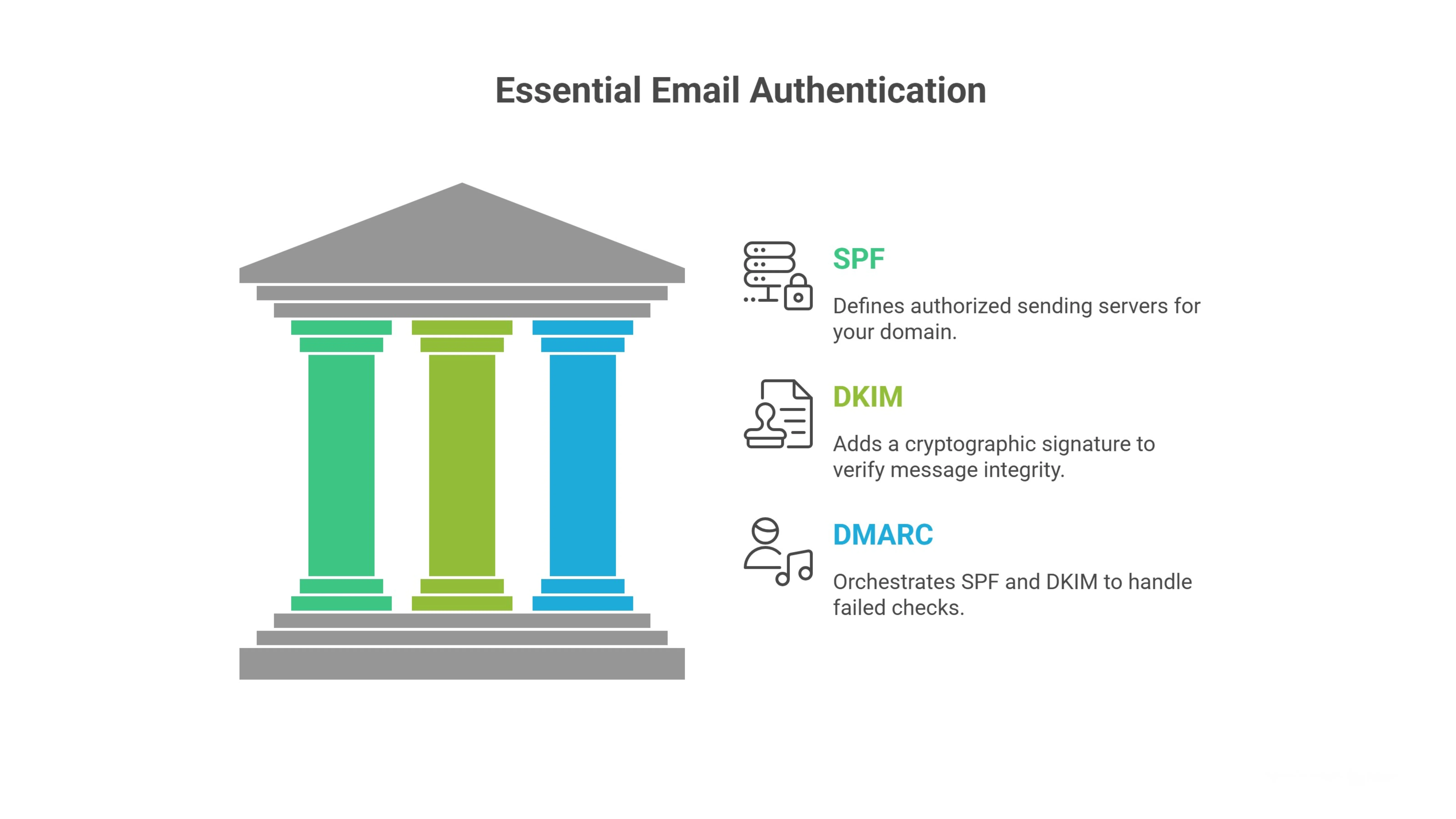
SPF defines which servers can send on behalf of your domain.
DKIM adds a cryptographic signature that confirms your message hasn’t been altered.
DMARC ties everything together and tells providers how to handle failed checks.
Even small DNS mistakes can break alignment and reduce trust.
Before launching campaigns, verify that all three records are correctly configured and passing validation tests. Strong authentication builds immediate technical credibility and protects you from spoofing or impersonation issues.
2. Use a Dedicated Sending Domain
Your primary business domain is valuable.
Using it for cold outreach increases risk if engagement drops or complaints rise.
A dedicated sending domain separates outreach activity from core business communication.
If something affects reputation, your main website and internal emails remain protected.
This approach gives you controlled flexibility.
You can scale, test, and optimize without endangering your brand’s primary domain authority.
Think of it as risk management for deliverability.
Serious outbound teams never mix promotional or cold traffic with their core domain infrastructure.
3. Gradually Warm Up New Domains & Mailboxes
Reputation builds over time, not overnight.
When a new domain suddenly sends hundreds of emails, spam filters see a red flag.
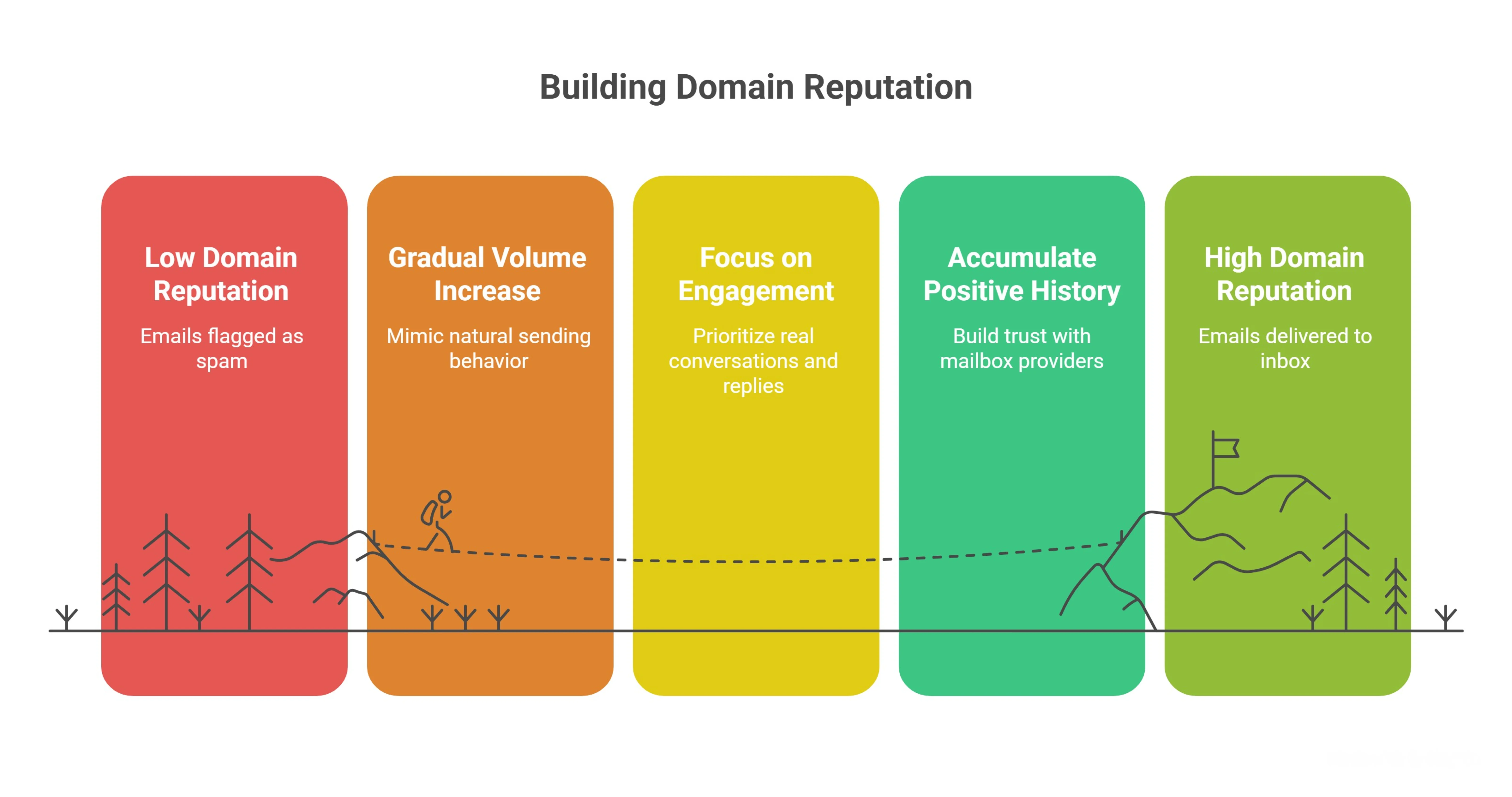
Warming up means starting with low daily volume and gradually increasing it.
This steady ramp-up mimics natural human sending behavior and builds positive engagement history.
Begin with small batches.
Focus on real conversations and replies instead of scale.
As positive engagement accumulates, mailbox providers assign more trust to your domain.
Skipping warm-up often leads to immediate spam placement that is difficult to recover from.
4. Maintain Clean and Consistent DNS Records
DNS records communicate your technical identity.
Inconsistent or outdated records weaken trust signals.
Make sure your sending domain has proper A records, MX records, reverse DNS (PTR), and authentication alignment.
Avoid duplicate or conflicting SPF entries.
Regular audits prevent configuration drift over time.
Even small errors can cause delivery failures or authentication misalignment.
Clean DNS structure sends a strong signal that your infrastructure is professionally managed.
Mailbox providers reward consistency because it reduces security risks.
5. Monitor Reputation & Blacklist Status
Deliverability problems rarely appear without warning.
Reputation scores decline gradually before inbox placement drops dramatically.
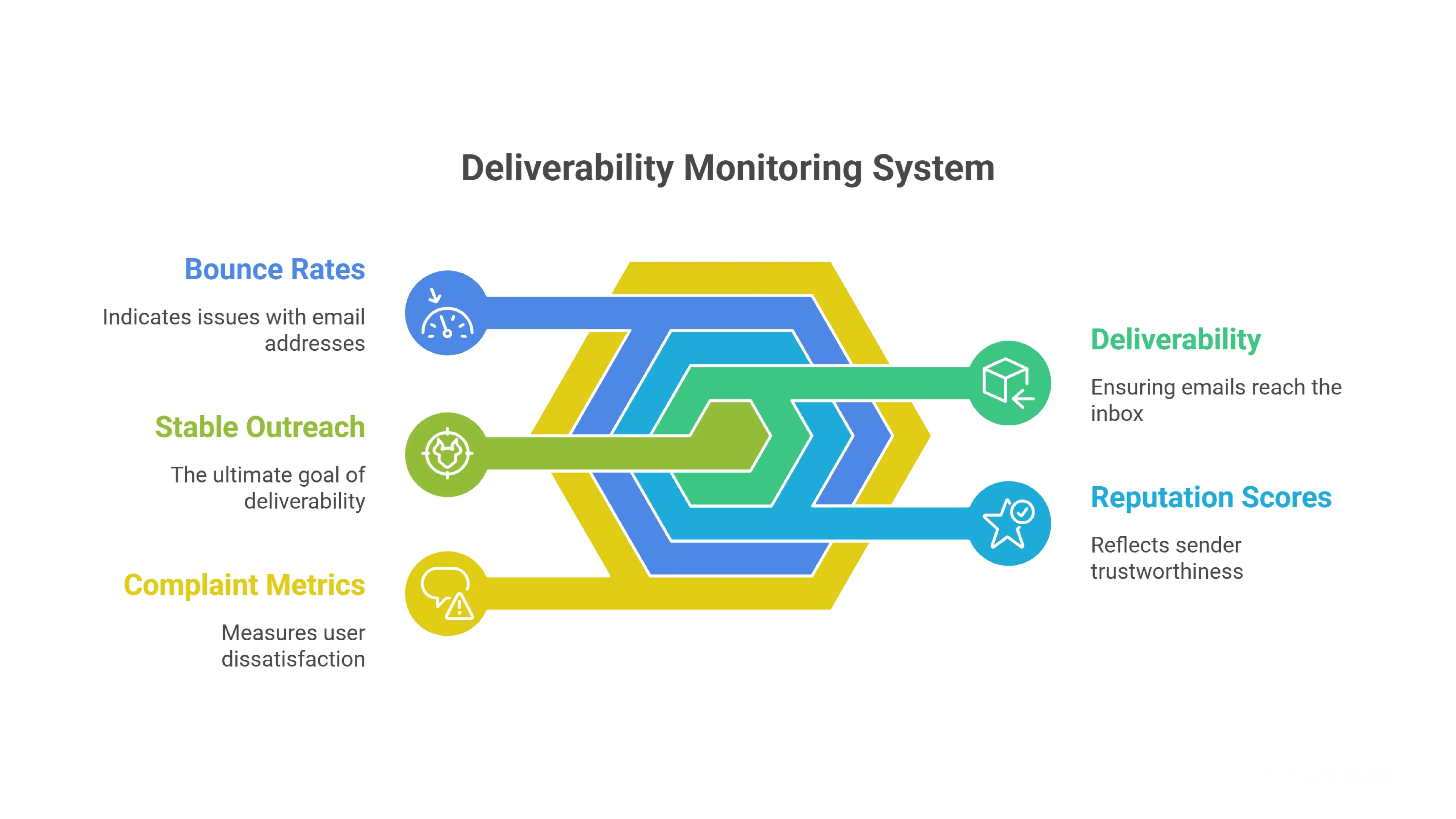
Monitor your sender score, domain reputation, bounce rates, and complaint metrics regularly.
Check public blacklists to ensure your IP or domain has not been flagged.
If you detect issues early, you can reduce sending volume, clean lists, or pause campaigns before serious damage occurs.
Ignoring monitoring is like driving without a dashboard.
Deliverability is an ongoing system, not a one-time setup.
Consistent oversight protects your domain and keeps your outreach stable as you scale.
6. Verify Email Addresses Before Campaign Launch
Your deliverability is only as strong as your list quality.
If you send emails to invalid or risky addresses, hard bounces increase immediately.
Mailbox providers track bounce rates closely.
Too many failed deliveries signal poor data hygiene and weaken your sender reputation.
Before launching any campaign, run your list through an email verification system.
Remove invalid, catch-all, disposable, and role-based addresses that could harm performance.
Verification protects your domain before damage happens.
It is always easier to prevent reputation issues than to repair them later.
Clean lists create cleaner metrics.
And clean metrics strengthen inbox placement.
7. Avoid Purchased or Scraped Contact Lists
Buying or scraping email lists might look like a shortcut.
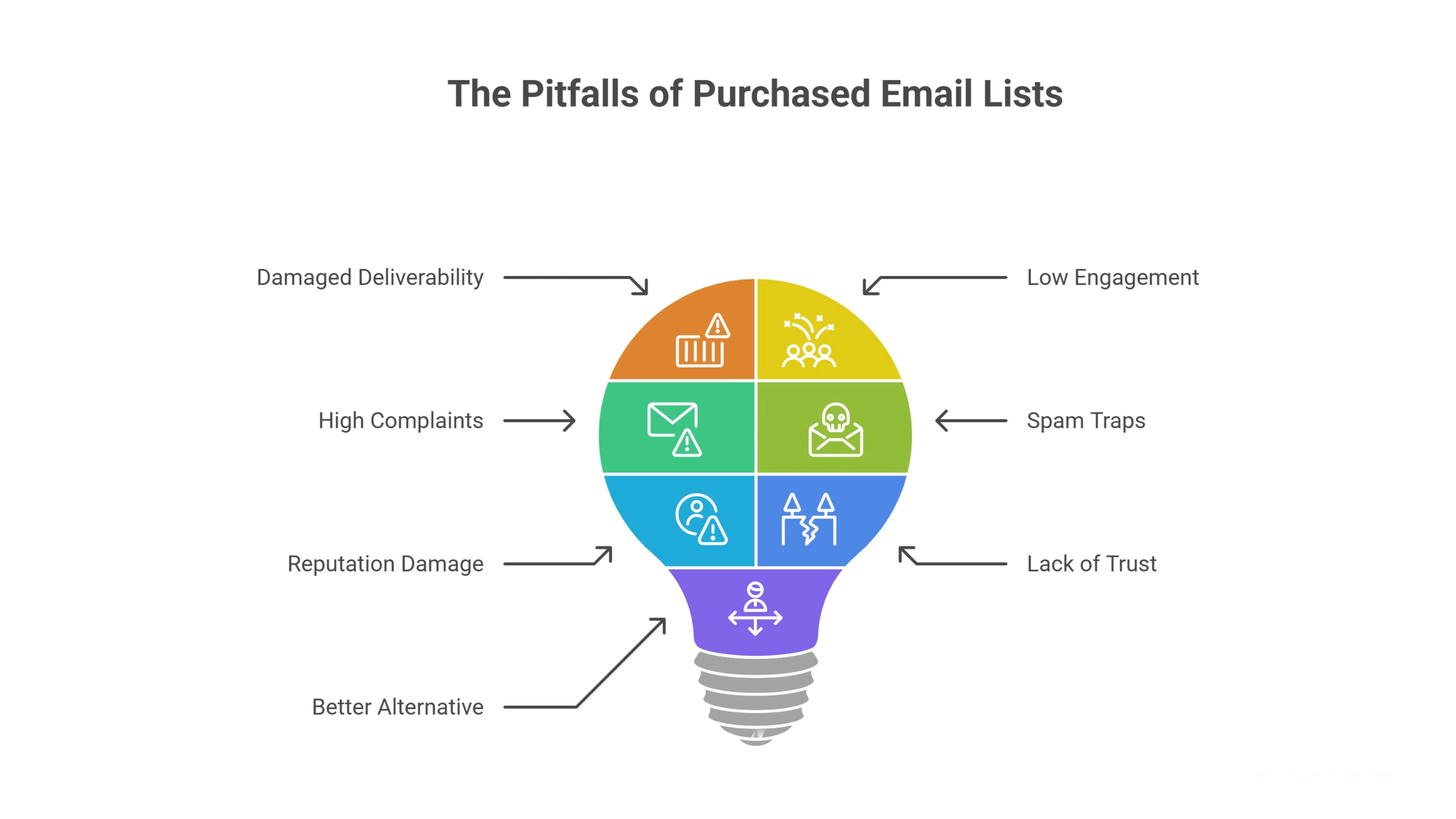
In reality, it is one of the fastest ways to damage deliverability.
These contacts never asked to hear from you.
Low intent leads to low engagement, high complaints, and spam reports.
Spam traps are often hidden inside public or resold databases.
Hitting even a few can significantly reduce your reputation score.
Deliverability depends on trust.
Purchased lists start the relationship without it.
Focus on building targeted, relevant prospect lists instead.
When your outreach is intentional and researched, engagement improves naturally and filtering risks decrease.
8. Segment Audiences for Relevance
Sending the same message to everyone weakens engagement signals.
Relevance drives opens, replies, and positive behavior.
Segment your audience based on industry, role, company size, pain points, or buying intent.
The more specific your segmentation, the stronger your engagement ratios become.
Mailbox providers notice patterns.
If a large portion of recipients ignore your emails, your reputation declines.
But when your emails consistently resonate with a defined group, interaction rates rise.
Higher engagement tells spam filters your messages belong in the inbox.
Segmentation is not just a marketing tactic.
It is a deliverability strategy.
9. Remove Inactive Contacts Regularly
Inactive subscribers silently hurt your performance.
They may not complain, but they do not engage either.
Low engagement ratios reduce your overall sender trust.
Mailbox providers compare opens and replies against total volume.
If a large portion of your list never interacts, your future emails are more likely to be filtered.
Run re-engagement campaigns periodically.
If contacts remain inactive after multiple attempts, remove them.
List pruning protects your engagement averages.
Smaller, engaged lists outperform larger, unresponsive ones.
Quality always beats quantity in deliverability.
10. Maintain Consistent Sending Patterns
Sudden volume spikes raise suspicion.
Mailbox providers look for predictable sending behavior.
If you send 50 emails per day for weeks and suddenly jump to 1,000, filters may interpret that as compromised activity.
Consistency builds behavioral trust over time.
Set stable daily limits.
Increase volume gradually and only after positive engagement trends.
Avoid long periods of inactivity followed by aggressive bursts.
Healthy deliverability depends on rhythm.
When your sending patterns mirror normal human behavior, mailbox providers view your domain as stable and trustworthy.
11. Personalize Based on Context, Not Just Name
Adding someone’s first name is not real personalization.
Mailbox providers evaluate how recipients interact with your emails, and shallow personalization rarely earns meaningful replies.
Context-based personalization focuses on relevance.
Mention their recent product launch, hiring trend, LinkedIn post, or company milestone.
When your message clearly reflects research, it feels intentional.
Intentional emails generate stronger engagement signals.
Higher replies and positive interactions improve inbox placement over time.
Relevance drives behavior, and behavior drives deliverability.
12. Keep Email Formatting Simple and Clean
Complex formatting increases filtering risk.
Heavy HTML, multiple images, tracking scripts, and large attachments often trigger promotional filters.
Plain-text or lightly formatted emails perform more consistently.
They resemble natural one-to-one communication instead of mass campaigns.
Avoid unnecessary design elements.
Focus on clarity and readability.
Short paragraphs, simple structure, and natural language create trust signals.
Clean formatting reduces technical red flags and supports stable inbox placement.
13. Limit Links and Avoid Over-Promotional Language
Too many links look suspicious.
Especially when combined with aggressive sales language.
Spam filters scan for patterns like excessive URLs, shortened links, and phrases that sound overly promotional.
Words like “guaranteed,” “limited time,” or “act now” increase risk when overused.
Use one clear call to action.
Keep your language conversational and value-driven.
When your email reads like a helpful message instead of an advertisement, filtering probability drops.
Subtlety protects deliverability.
14. Encourage Natural Replies
Replies are one of the strongest positive engagement signals.
Mailbox providers interpret conversations as proof that your emails are wanted.
Ask open-ended questions.
Invite feedback instead of pushing links.
Even simple responses improve your reputation score.
Ongoing conversations reinforce trust with mailbox algorithms.
Deliverability improves when engagement becomes two-directional.
Focus less on clicks and more on starting real discussions.
15. Track Bounce and Complaint Rates Closely
Negative signals damage reputation quickly.
High bounce rates suggest poor data hygiene.
Spam complaints signal irrelevance.
Both directly impact inbox placement.
Monitor these metrics daily or weekly depending on volume.
Set internal thresholds that trigger investigation before problems escalate.
If bounce rates rise, pause sending and clean your list.
If complaints increase, review targeting and messaging.
Deliverability is a measurable system.
When you track warning signs early, you protect long-term inbox stabil
Applying Email Deliverability Best Practices at Scale with Oppora
Scaling outbound isn’t about sending more emails it’s about controlling infrastructure and maintaining strong engagement signals as volume increases.
Oppora simplifies deliverability management through structured automation that protects sender reputation at every layer. From domain warm-up and built-in email verification to controlled multi-mailbox scaling, sender matching, AI personalization, and automated reply handling every system works together to maintain healthy inbox placement while scaling outreach safely.
Automated Domain & Mailbox Warm-Up
Oppora automatically warms up new domains and sender mailboxes before scaling outreach volume.
Instead of manually managing warm-up tools, the system gradually increases daily sending limits and monitors engagement signals to protect domain reputation.
You can:
- Connect and manage multiple inboxes
- Gradually scale daily sending volume
- Rotate mailboxes to distribute sending activity
- Protect domains from sudden spikes or spam triggers
This structured warm-up system enables controlled multi-mailbox scaling without risking domain burn.
Match Sender Mailbox
Deliverability improves when sender identity matches the recipient’s email provider.
Oppora automatically matches sender mailboxes based on provider for example, Gmail-to-Gmail or Outlook-to-Outlook increasing trust signals and improving open rates.
This reduces:
- Cross-provider spam filtering
- Suspicious sender mismatches
- Inbox placement issues
By aligning sender identity with recipient infrastructure, Oppora strengthens deliverability at scale.
Built-In Email Verification
Healthy inbox placement starts with clean data.
Oppora verifies every contact before sending using layered validation methods, including standard checks and advanced SMTP verification.
This ensures:
- Lower bounce rates
- Reduced spam complaints
- Higher sender reputation stability
- Safer campaign scaling
Invalid or risky emails are filtered before they can damage your domain.
Personalize Email with AI to Prevent Copy Fatigue
Repeated patterns and recycled templates trigger spam filters over time.
Oppora uses AI to generate unique, context-aware messaging for each prospect, eliminating predictable structures and spintext patterns that create copy fatigue.
This helps you:
- Avoid spam pattern detection
- Maintain freshness across campaigns
- Improve reply quality
- Sustain long-term deliverability
Instead of rewriting templates weekly, your messaging continuously adapts and evolves.
AI Reply Handling to Strengthen Engagement Signals
Positive engagement is the strongest deliverability signal.
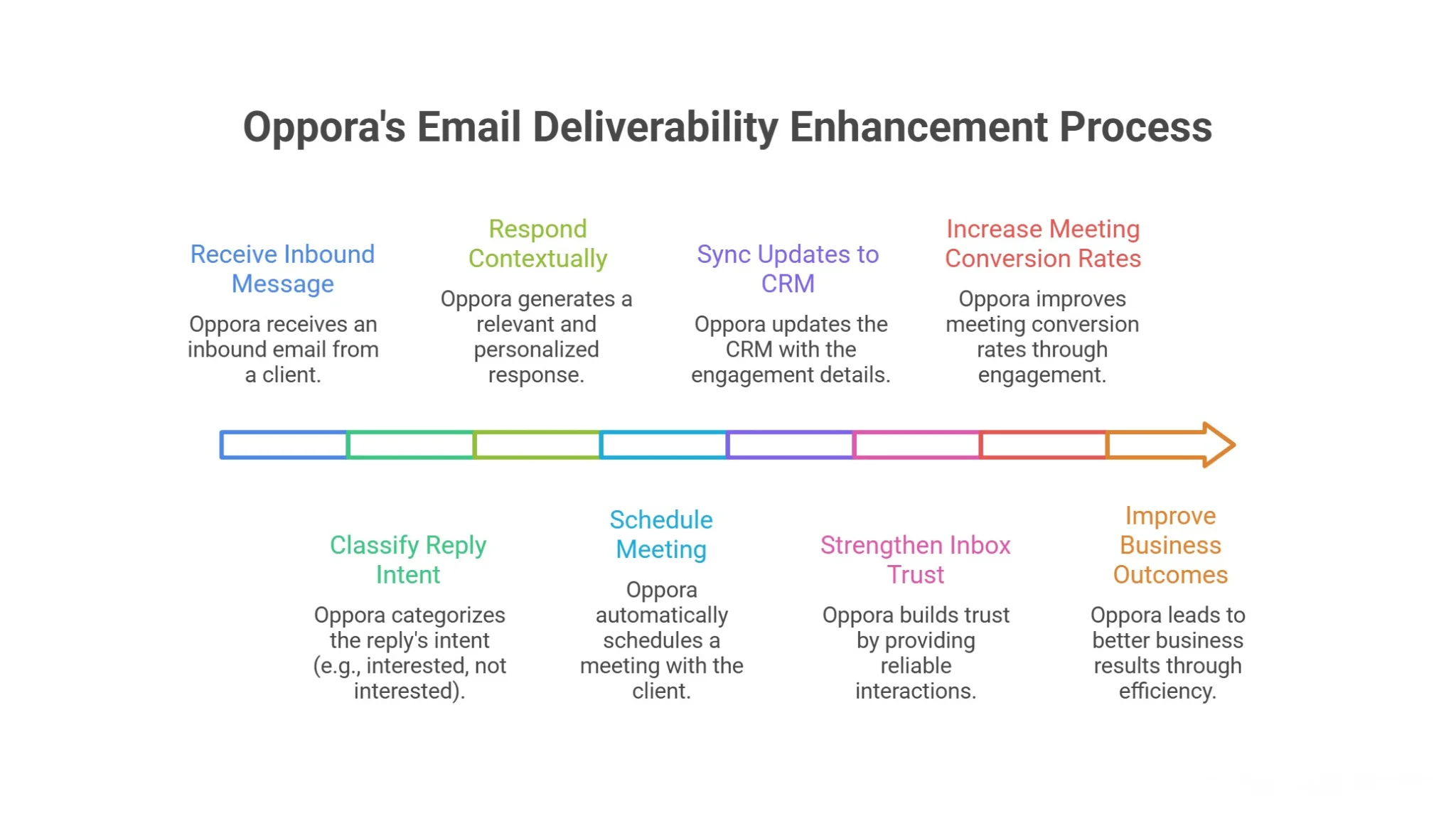
Oppora’s AI Reply Assistant reads inbound messages, classifies intent, responds contextually, and books meetings automatically.
It can:
- Categorize replies (Interested, Not Interested, etc.)
- Send intelligent follow-ups
- Answer questions
- Schedule meetings
- Sync updates to CRM
By turning replies into structured engagement, Oppora strengthens inbox trust while increasing meeting conversion rates.
Conclusion
Email deliverability is not a trick.
It’s a system built on clean infrastructure, disciplined sending behavior, accurate targeting, and consistent engagement.
When you follow the best practices for improving email deliverability, you protect your domain while creating predictable inbox growth.
Small habits like monitoring reputation, verifying contacts, and maintaining steady volume compound over time.
If you plan to scale outbound without risking burned domains or unstable inbox placement, having structured systems in place makes a real difference.
That’s exactly where platforms like Oppora help by building deliverability safeguards directly into your outreach workflow so you can grow safely and sustainably.
Frequently Asked Questions (FAQs)
How long does it take to improve email deliverability?
It depends on your current reputation. If your domain is healthy, improvements can show within weeks. If reputation is damaged, recovery may take several months of consistent low-volume sending, list cleaning, and strong engagement signals to rebuild inbox trust.
Does switching email providers improve deliverability?
Changing providers alone won’t fix deliverability issues. Reputation is tied to your domain and sending behavior, not just the tool you use. Without improving targeting, authentication, and engagement, problems usually follow you to the new provider.
Can cold email still reach the primary inbox in 2026?
Yes, but only with disciplined infrastructure and relevance. Mailbox providers prioritize engagement and trust. If your emails are personalized, properly authenticated, and sent at consistent volume to clean lists, cold outreach can still land in the primary inbox.
How many emails can I safely send per day per mailbox?
There’s no universal number. Safe volume depends on domain age, reputation, and engagement history. Many healthy mailboxes operate between 30–60 cold emails daily, but gradual scaling and monitoring performance metrics matter more than hitting a specific limit.
What is the difference between delivery rate and inbox placement rate?
Delivery rate measures whether an email was accepted by the server. Inbox placement rate measures whether it landed in the primary inbox instead of spam or promotions. You can have high delivery but poor inbox placement if reputation or engagement signals are weak.