How to Warm Up Email Domain for Cold Email Marketing using AI
warm up email domain, warming up email domain, how to warm up a domain for email marketing, warm up domain for cold email, how long email warm up domain, how to warm up an email domain fast, how to warm up email domain
If you are launching a cold outreach campaign today, you aren't just competing with other sales reps; you are competing with the most sophisticated AI spam filters in history.
For any new sender, the biggest hurdle is the "Cold Start" problem. In 2026, Gmail, Outlook, and Yahoo flag new domains by default. If you register a domain on Monday and send 500 emails on Tuesday, your domain will be blacklisted before your first cup of coffee.
The era of manual, tedious ramp-ups is over. Modern growth teams have transitioned to high-precision AI automation. Understanding how to warm up email domain correctly isn't just a "nice to have" it is the ultimate insurance policy for your outreach ROI. Without it, your carefully crafted messages will never see the light of day.
Before we look at the 'how,' we must understand the fundamental mechanics of domain trust.
What Is Email Domain Warm Up
Email domain warm-up is the intentional process of gradually increasing your sending volume to establish trust with Email Service Providers (ESPs). It acts as a digital handshake, proving your mailbox is operated by a real human rather than a spam bot, which is essential for long-term deliverability. Understanding this core definition is just the start; the real value lies in the long-term protection it provides.
Why Email Domain Warm Up Matters
Warming up your domain is not just a technical step; it is the foundation of your entire sales engine.
Domain Reputation as the Primary Signal
In the past, deliverability was mostly about the server (IP) you used. Today, the domain itself is the primary signal for trust.
Your domain reputation follows your brand everywhere. If your domain is "burned," switching servers will not save your outreach performance.
Building a "Trust Bridge" with ESPs
Think of an ESP like a security guard. If a stranger shows up with a megaphone (a new domain with high volume), they get blocked.
If a regular visitor shows up and has meaningful conversations, they are welcomed. Domain warming is how you become that regular visitor.
Preventing Blacklisting and Permanent Blocks
Skipping the warm-up process triggers immediate fraud alerts. This often leads to your domain being added to global blacklists like Spamhaus.
Once blacklisted, your emails are rejected before they reach the server. This can permanently cripple your ability to communicate with prospects.
Avoiding the "Shadow-Ban" Trap
Sometimes, providers won't block you entirely but will route all emails to the spam folder silently. This is known as shadow-banning.
Warming ensures you land in the primary inbox. Without it, you waste your best leads on messages that are never actually seen.
Protecting Your Outreach ROI
A domain with a "reputation of zero" is an expensive liability. It forces you to restart your entire infrastructure from scratch.
Proper warming acts as an insurance policy. It protects your investment in leads and tools by guaranteeing your messages reach their destination.
To avoid these risks, you need to understand exactly how the gatekeepers are judging your behavior.
How Email Providers Judge a New Sending Domain
To win the deliverability game, you have to play by the rules of the algorithms. ESPs look for specific signals to determine if you are a "real human" or a "spam bot."
Positive Signals
To build trust, your warming-up email domain strategy must generate:
- High Open Rates: Proving that people actually want to see your content.
- Meaningful Reply Ratios: The single strongest signal of trust is a two-way conversation.
- Marking as Important/Starring: This tells the filter that your content is high-priority.
- Removing from Spam: If a warm-up email lands in spam and is manually moved to the inbox, your reputation spikes.
Negative Signals
Conversely, you must avoid:
- High Bounce Rates: Sending to invalid or "dirty" lists.
- Spam complaints: Users clicking "Report Spam" on your messages.
- Mass Deleting: When recipients delete your email without even opening it.
Consistency vs. Spikes
Consistency is the key to bypassing 2026 filters. A sudden spike in activity is a massive red flag. Steady, incremental growth is the only way to prove you are a legitimate business sender.
Understanding these signals is vital, but you cannot begin the process until your technical foundation is set.
How Email Warmup Works
Email warmup works by creating a high-fidelity simulation of "perfect" user engagement. Rather than just sending volume, it focuses on the quality of interactions to prove to Email Service Providers (ESPs) that your domain is a valuable, legitimate sender.
Here is the step-by-step breakdown of how the mechanism functions:
- Connection to a Trusted Pool: Your mailbox is joined to a network of verified, healthy mailboxes (including control inboxes and peers) that act as the receiving end of your communications.
- Simulated Human Interaction: The system sends emails with varied, campaign-aligned content. These are not static templates; they are AI-generated messages that look like real business correspondence.
- Positive Engagement Signals: Once an email is received in the pool, the system triggers actions that ESPs value most:
- Opens: Demonstrates that the content is relevant and requested.
- Replies: Signals a high-value, two-way conversation, which is the gold standard of trust.
- Starring/Marking as Important: Explicitly tells the provider's algorithm that your domain is a priority sender.
- Moving from Spam: If an email is caught in a filter, the system manually rescues it, signaling to the ESP that the filter made a mistake.
- Reputation Compounding: By gradually increasing the frequency and volume of these successful interactions, you build a "history of trust." This compounding effect eventually outweighs the initial suspicion associated with new domains.
With the mechanism understood, the next step is ensuring your technical infrastructure is prepared for a clean start.
Technical Prerequisites for Warming up Email Domain
Before you start the actual email domain warm-up, your infrastructure must be flawless. You need to prove you are who you say you are.
Setting Up the "Trust Trinity"
You must configure three core authentication protocols to prove you own your domain:
- SPF (Sender Policy Framework): Specifies which mail servers are authorized to send email for you.
- DKIM (DomainKeys Identified Mail): Adds a digital signature to ensure emails aren't tampered with.
- DMARC (Domain-based Message Authentication): Tells receivers what to do if an email fails SPF or DKIM.
Custom Tracking Domains
Never use "shared" tracking pixels. Shared pixels leak reputation from other (potentially bad) senders to your domain. Always set up a custom tracking domain so your reputation is entirely in your own hands.
Domain Age vs. Warmup
A domain needs to "age" for at least 14–30 days. Buying a domain and starting a warm up domain for cold email immediately is a red flag. Give the domain a few weeks to exist in the "background" of the internet first.
With the technical pillars in place, we can now explore the modern AI workflow that makes this entire process hands-off.
How to warm up a domain for email marketing using Oppora AI
Traditional warm-up tools are often "rule-based," meaning they send robotic templates on a rigid schedule that filters easily spot.
Oppora is an AI-powered outreach platform that takes care of the entire outreach workflow, including prospecting, sending emails, replying via AI Reply Agent, and warm-up as well. By integrating warming directly into your SDR workflow, Oppora builds "Agentic Trust" through a clear, automated process. Here is exactly how to warm up your domain using Oppora:
Step 1: Secure Mailbox Connection
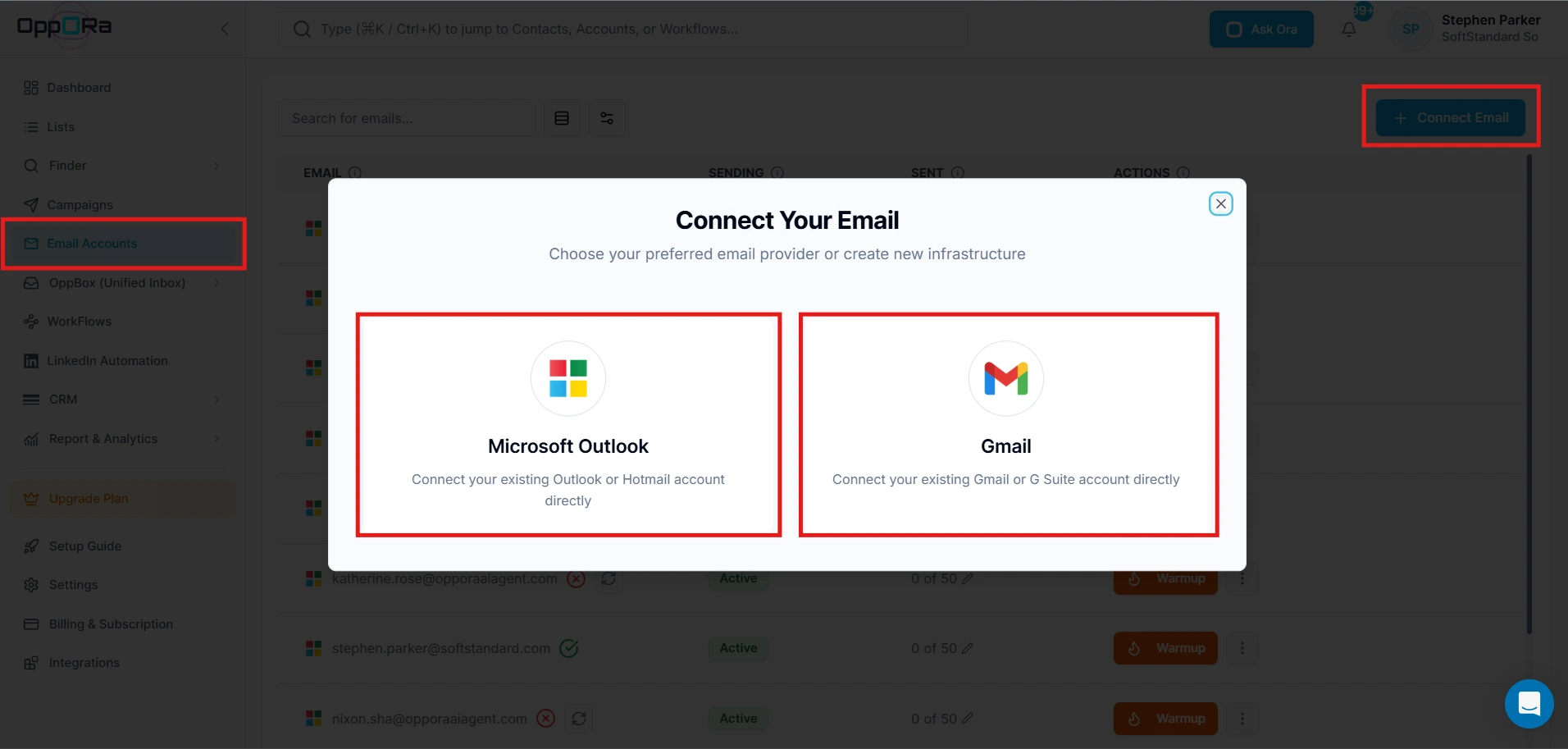
The process begins with connecting your mailbox via OAuth 2.0. Oppora integrates directly with Google, Microsoft, and Zoho APIs, avoiding the security risks and connection drops of old IMAP methods. Once connected, the system immediately establishes a Baseline Score to verify your DNS records (SPF/DKIM/DMARC) are correctly configured.
Step 2: Configuring the Growth Curve
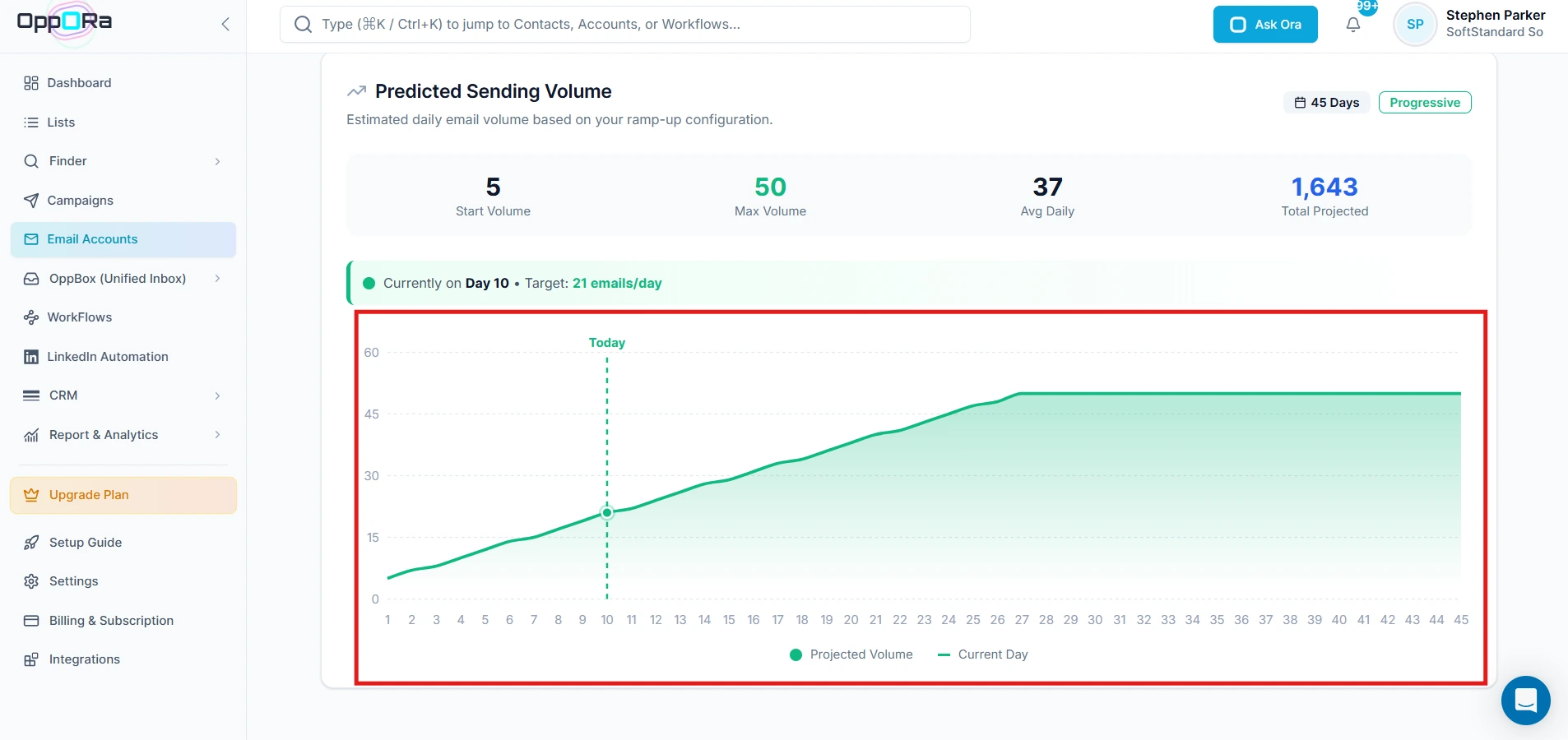
After connection, you set your warm-up sending schedule and volume limits. Oppora utilizes a Logarithmic Growth Curve over a 45-day cycle. Instead of risky "jumps" in volume, the system starts with a "Slow Burn" of 5–8 emails per day and gradually increases as the system confirms trust. This mimics the natural ramp-up of a new human employee.
Step 3: AI-Driven Behavioral Engagement
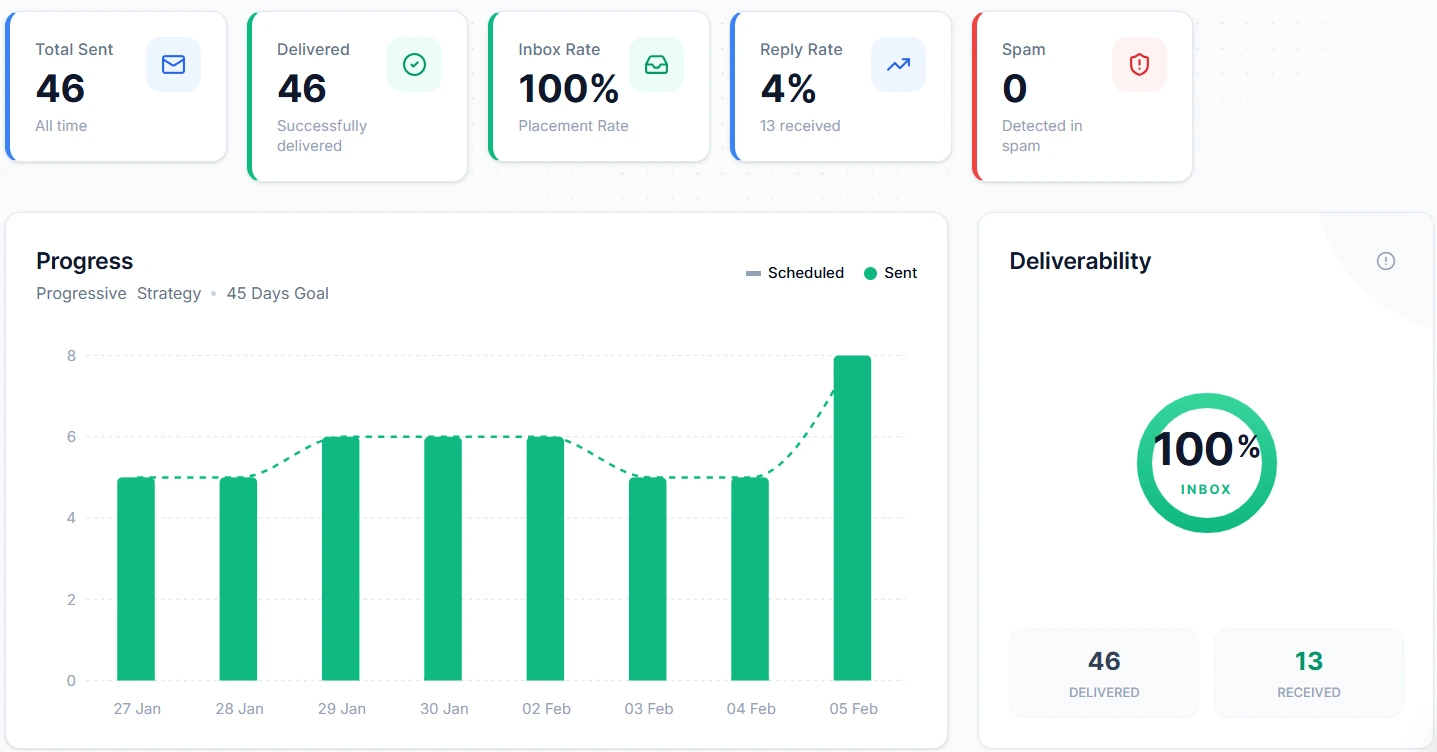
Once active, Oppora’s AI manages your interactions across a 70/30 Hybrid Network:
- 70% Control Traffic: High-precision inboxes used to run Benchmark Scores and verify real-time placement.
- 30% Peer Interaction: Your emails reach real mailboxes in the Oppora community. The system doesn't just "send" emails; it generates Campaign-Aligned AI Content and triggers automated replies. These peers open, star, and reply to your emails, providing the behavioral trust signals that tell ESPs your mailbox is a high-quality human sender.
Step 4: Monitoring Health & Placement
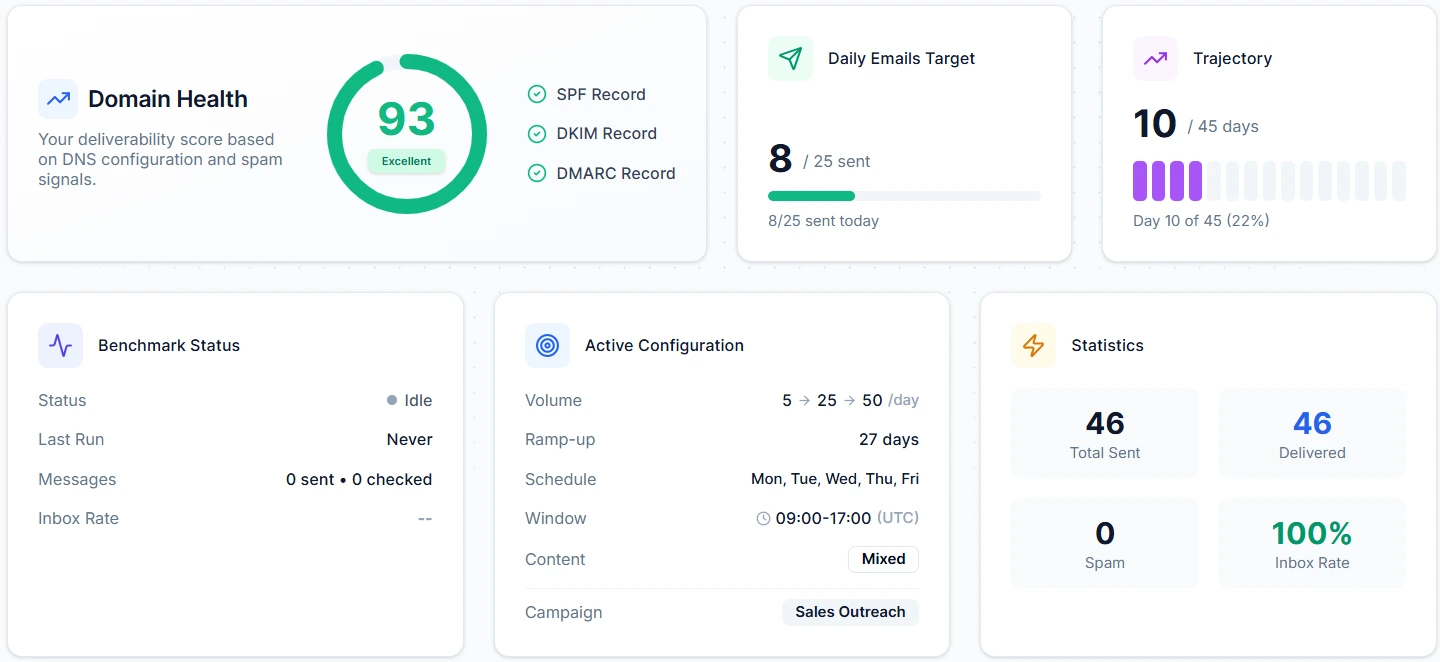
Throughout the process, you can monitor your Health Score (0–100). This score is a weighted average of your Inbox Placement (45%), Bounce Rate (15%), Domain Signals (15%), Maturity (15%), and Reply Rate (10%). If your placement drops below 70%, Oppora’s Feedback Loop automatically switches to a "Progressive Strategy," slowing down sends until your reputation recovers.
Step 5: Transition to Outreach & Ongoing Maintenance
Once your health score reflects high reputation, you can begin your active outreach campaigns. However, deliverability is not a one-time achievement. To maintain your trust levels, you should keep the warm-up system active sending at least 10 emails per day indefinitely to ensure your inbox stays "hot" and protected against future fluctuations.
Oppora transforms domain warming from a high-risk manual task into a "set and forget" engine for deliverability. It bridges the gap between technical setup and real-world sales outcomes, ensuring your mailbox builds the credibility it needs to stay out of the spam folder permanently.
While the system handles the heavy lifting, your long-term success still depends on following industry-standard safety protocols.
Best practices for warming up a new email domain
To ensure a 99% inbox placement rate, follow these best practices for warming up a new email domain:
- Maintain a 30%+ Reply Ratio: Sending is only 50% of the job. You need responses to build real trust. Oppora’s AI pool ensures your emails are replied to by other "human-like" accounts.
- Use AI-Generated Content: Avoid using "Lorem Ipsum" or generic filler text. Your warm-up content should be varied, niche-relevant, and readable.
- Verified Data Only: Ensure your "seed" lists for warm-up are 100% clean. A single bounce during the first week of a warm up email domain process can set your reputation back by weeks.
- Separate Your Inboxes: Never warm up your primary business domain (e.g., [email protected]) for cold outreach. Always use secondary "look-alike" domains to keep your main infrastructure safe.
Success is as much about what you do as what you avoid. Let's look at common traps.
Common Mistakes and Troubleshooting
Even with the best tools, it is easy to make a mistake that triggers a block.
Starting Too Fast
The "Flash in the Pan" mistake is the most common. Users try to reach how to warm up an email domain fast by jumping from 10 to 100 emails in three days. This triggers immediate fraud alerts.
Mixing Marketing and Cold Email
Newsletters (high volume, low reply) and cold outreach have different reputation profiles. Never mix them on the same domain.
Ignoring Google Postmaster
If your open rates drop suddenly, check Google Postmaster Tools. It provides a direct look at how Google views your reputation. If it drops to "Medium," pause your outreach and increase your AI warm-up volume immediately via Oppora’s Progressive Strategy.
By avoiding these pitfalls, you pave the way for a deliverability strategy that scales alongside your business.
Conclusion
In the modern sales landscape, deliverability is no longer about "luck" it is about infrastructure. The warm-up email domain process is the most critical step in building a sustainable outbound engine.
AI automation is the only way to stay ahead of evolving spam filters. By using an agentic system like Oppora, you ensure that your domain reputation is built on a foundation of genuine-looking engagement and technical perfection.
Ready to stop worrying about the spam folder? Launch your first automated warm-up loop with Oppora.ai today and build the trust your outreach deserves.
Frequently Asked Questions (FAQ)
How many email addresses to warm up a domain?
Ideally, you should warm up one or two inboxes per domain. For a standard cold outreach campaign, most teams find that 2-3 domains (with 2 inboxes each) provide enough volume while keeping individual inbox activity low and safe.
How to warm up an email domain fast?
The "safest" way to accelerate is by using AI-controlled engagement. While you cannot skip the 14-day minimum threshold, an AI agent like Oppora can safely ramp up your volume faster than manual sending by ensuring a 100% "perfect" engagement ratio (opens, stars, and replies) for every email sent.
Can I use my primary domain for cold email warm-up?
No. This is highly discouraged. Cold outreach inherently carries a higher risk of spam reports. If your primary domain gets blacklisted, your entire company’s day-to-day communication will break. Always use "secondary" domains.
Do I need a separate warm-up tool if I use Oppora.ai?
No. Oppora.ai is a unified agentic platform. It includes high-precision domain warm-up as a native feature of its SDR workflow, meaning you don't need to pay for or manage a separate subscription.