Automate Email Outreach to Local Business with Oppora AI

Reaching local businesses may sound simple at first.
But finding leads, identifying decision-makers, verifying emails, writing messages, and sending follow-ups can quickly become time-consuming.
Oppora AI brings these steps into one connected workflow.
You can find local businesses, enrich contact details, verify email addresses, create personalized cold emails, automate follow-ups, and track results from one place.
In this guide, you’ll learn how to:
- Build targeted local prospect lists
- Automate personalized email outreach
- Protect email deliverability
- Track replies, meetings, and CRM activity
This makes it easier to scale outreach without adding more manual work.
How Oppora AI Automates Local Business Outreach from Start to Finish
Local business outreach involves much more than sending a cold email.
You must find relevant companies, identify decision-makers, verify their contact details, write personalized messages, manage follow-ups, and track every response.
Oppora AI connects these tasks in one automated workflow
You can build the process once, define your target audience, and let the platform move prospects from discovery to conversation.
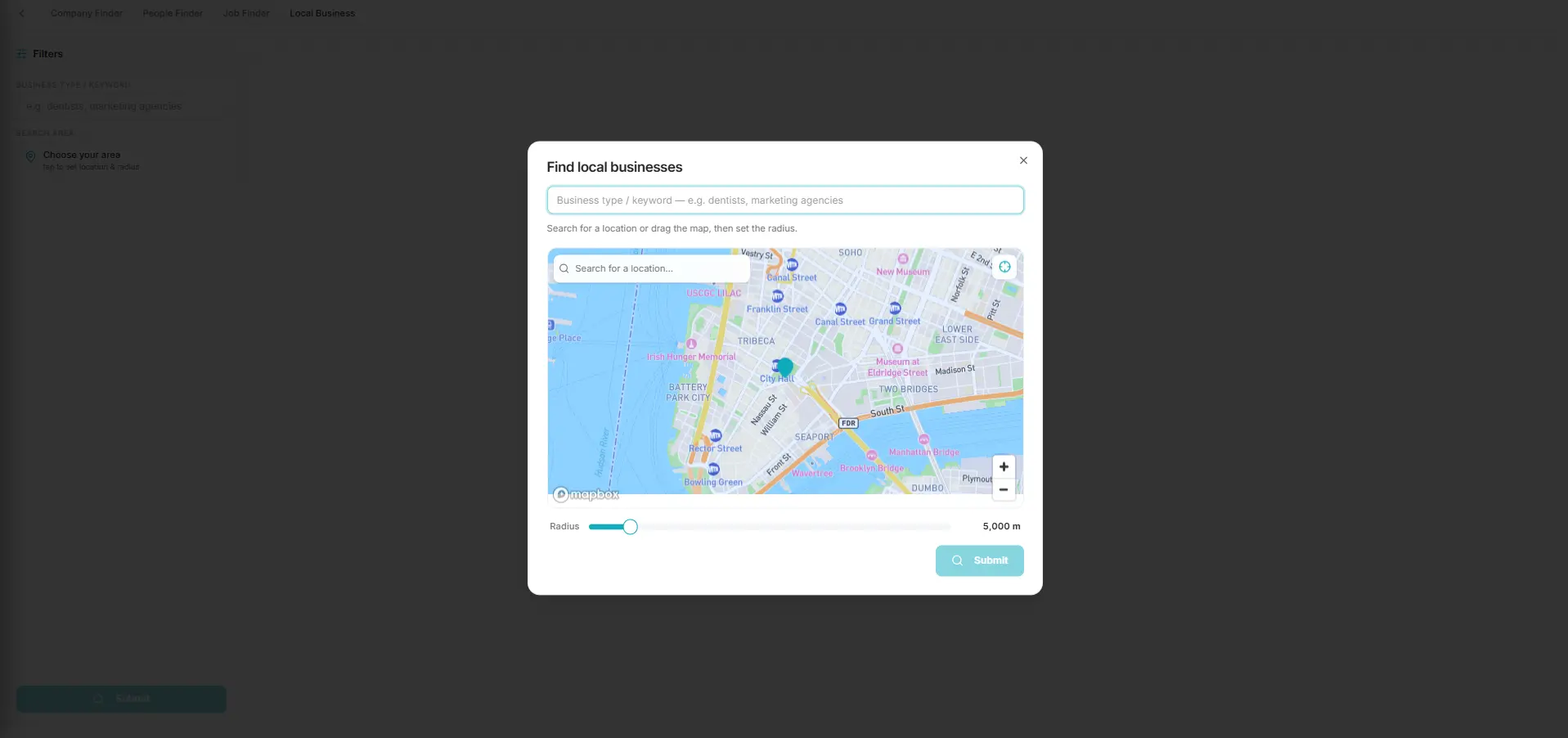
Step 1: Find Local Businesses Directly from Google Maps
Your campaign starts with a focused list of businesses that are likely to need your services.
Oppora AI helps you find local companies directly from Google Maps using search criteria such as:
- Business type
- City or location
- Industry or niche
- Service category
- Target market
You could search for dental clinics in London, roofing companies in Dallas, or accounting firms in Toronto.
This approach gives you access to real businesses operating in the exact markets you want to target.
It also helps you avoid purchasing large prospect lists filled with irrelevant, outdated, or poorly matched companies.
The more specific your search criteria are, the more relevant your outreach becomes.
A web design company could target local businesses with outdated websites. An SEO agency could focus on companies with weak search visibility or incomplete online profiles.
Once Oppora finds the right businesses, it can automatically move them into the next stage of your outreach workflow.
You do not need to copy business information into spreadsheets or manage different lists manually.
Suggested Reading:
Find 1000s of Local Businesses Without Websites for FREE in 5 MinStep 2: Enrich Businesses with Verified Decision-Maker Contacts
Finding the right company does not guarantee that your message will reach the right person.
You still need to identify someone who can understand your offer and make a buying decision.
Depending on the business, that person may be the:
- Owner
- Founder
- Marketing manager
- Operations manager
- Sales director
- General manager
Oppora AI enriches each business profile with relevant decision-maker information.
This saves you from visiting company websites, searching through LinkedIn profiles, and researching contacts one business at a time.
Oppora uses multiple data sources instead of depending on one database.
This waterfall enrichment process helps you find more complete and accurate contact information.
You can also filter and organize prospects based on details such as:
- Job title
- Location
- Company type
- Business size
- Contact relevance
As a result, you build a more focused list of people who are likely to have the authority to consider your offer.
Better contact targeting also improves personalization because you can shape each message around the recipient’s role and responsibilities.
Step 3: Verify Email Addresses Automatically Before Outreach
A contact list is only useful when the email addresses are accurate.
Sending messages to invalid or inactive addresses can increase bounce ratesand damage your sender reputation.
That damage may reduce the chances of future emails reaching your prospects’ inboxes.
Oppora AI verifies email addresses before adding them to an active campaign.
The verification process helps you identify and remove:
- Invalid email addresses
- Outdated contacts
- Risky addresses
- Unreachable inboxes
- Incorrectly formatted emails
You avoid wasting campaign capacity on contacts who cannot receive your message.
You also reduce the need to upload your list to a separate email verification tool.
Because verification is part of the same workflow, your prospects can move from enrichment to campaign preparation automatically.
This gives you a cleaner contact list and a stronger foundation for maintaining email deliverability.
Step 4: Generate AI-Personalized Cold Emails in Seconds
Once your prospect list is ready, you need to give each recipient a reason to respond.
Generic cold email templates rarely achieve that.
Local business owners receive plenty of messages that feel automated, irrelevant, or copied from the same template.
Oppora AI creates personalized cold emails using the data available about each business and decision-maker.
Your message can reference details such as:
- The recipient’s name and role
- The company’s location
- Its industry or services
- Its website
- A relevant business challenge
- A possible growth opportunity
This allows you to explain why you are contacting that specific business.
A web design agency could mention a poor mobile experience on the company’s website.
An SEO consultant could highlight a local search opportunity or a missing element in the business profile.
The personalization goes beyond adding a first name to a standard email.
Oppora can generate each line with AI, helping your messages sound more natural and relevant.
You can still control the tone, offer, structure, and call to action.
Oppora simply handles the repetitive writing required to personalize messages across a large prospect list.
Step 5: Build Automated Email Sequences That Convert
Many prospects will not reply to your first message.
They may be busy, overlook the email, or intend to respond later.
A complete outreach sequence gives you more opportunities to start a conversation without repeatedly following up by hand.
With Oppora AI, you can build a sequence that includes:
- An initial introduction
- A value-focused follow-up
- A reminder email
- A final follow-up
- Custom delays between each step
Every message should serve a purpose.
Your first email can introduce your offer and explain why it is relevant.
The next email can add useful context, answer a common concern, or present another reason to consider your service.
Later follow-ups can remain brief and make it easy for the recipient to respond.
You can also create different workflow paths based on prospect activity.
This helps your campaign respond more naturally to what each recipient does, rather than forcing everyone through the same rigid sequence.
Suggested Reading:
How to Nurture Cold Leads With Automated Email SequencesStep 6: Launch Campaigns and Automate Follow-Up Emails
After building your sequence, you can launch the campaign without managing every message manually.
Oppora AI sends emails based on the schedule, limits, and workflow conditions you select.
You can control important campaign settings, including:
- Sending days
- Daily email limits
- Delays between messages
- Connected mailboxes
- Follow-up timing
- Sequence conditions
You can also connect and rotate multiple mailboxes.
This helps you distribute sending activity instead of placing all campaign volume on one inbox.
Oppora supports inbox warm-up and controlled sending patterns to help protect your sender reputation.
When a prospect does not respond, the next follow-up can be sent automatically.
When someone replies, Oppora can stop the remaining messages so that the recipient does not continue receiving unnecessary follow-ups.
Its AI Reply Agent can also help manage incoming conversations by:
- Answering common questions
- Sharing relevant information
- Handling basic objections
- Qualifying interest
- Sending booking links
- Guiding prospects toward a meeting
You maintain control over the campaign strategy while Oppora handles the repetitive execution.
Step 7: Track Replies, Booked Meetings, and CRM Updates from One Dashboard
Your work does not end when the emails are sent.
You need to understand which messages generate replies, which prospects show interest, and which opportunities require attention.
Oppora brings campaign activity into one dashboard.
From there, you can monitor:
- Email replies
- Prospect engagement
- Positive responses
- Booked meetings
- Bounce activity
- Campaign performance
- Follow-up progress
A shared inbox also helps you manage conversations across connected mailboxes.
This is useful when several people are handling outreach or responding to prospects.
You can review which email versions perform well and use those insights to improve future campaigns.
Oppora can also sync sales activity with your CRM.
This may include:
- New contacts
- Email replies
- Tasks
- Meetings
- Deal updates
- Prospect activity
Your records stay updated without constant manual data entry.
By connecting prospecting, enrichment, verification, personalization, sending, replies, and CRM updates, Oppora turns local business outreach into one continuous process.
You spend less time switching between tools and more time speaking with interested prospects, improving your offer, and closing new business.
Why Oppora AI Is Different from Traditional Outreach Tools
Traditional outreach tools often solve only one part of the process.
You may need one tool for lead generation, another for email verification, a separate AI writer, an outreach platform, and a CRM to track responses.
Oppora AI brings these steps together, so your local business outreach runs as one connected system.
Replace Multiple Sales Tools with One AI-Powered Platform
Oppora uses eight connected AI sales agents to manage the complete outreach process.
These agents can help you:
- Find relevant local businesses
- Identify decision-makers
- Enrich and verify contact details
- Write personalized emails
- Send automated follow-ups
- Manage replies
- Book meetings
- Update your CRM
You no longer need to move prospect data between multiple platforms or repeat the same setup in different tools.
Build the workflow once, and the agents continue executing each step based on your rules.
Prospect Directly from Google Maps Instead of Outdated Databases
Large contact databases can be useful, but they may include companies outside your target area or businesses that are no longer relevant.
Google Maps gives you a more location-focused starting point.
You can search by:
- City
- Business category
- Industry
- Service area
- Local niche
This helps you focus on real businesses operating in the market you want to reach.
Instead of starting with a broad list and removing hundreds of irrelevant records, you begin with prospects that already match your location and business criteria.
Combine AI Writing, Outreach, CRM, and Automation in One Workflow
Oppora is not limited to generating cold email copy.
It connects AI writing with prospecting, contact verification, sending, follow-ups, reply management, reporting, and CRM updates.
The workflow can move a prospect through each stage automatically:
Find → Enrich → Verify → Personalize → Send → Follow Up → Reply → Update CRM
Contacts, replies, meetings, tasks, and deals can also sync with Oppora CRM or platforms such as HubSpot, Salesforce, and Pipedrive.
This keeps your outreach activity organized without constant manual data entry.
Scale Local Business Outreach Without Increasing Manual Work
Traditional scaling often means hiring more people or spending more time managing campaigns.
Oppora lets you scale by automating the repetitive work behind each campaign.
You can connect multiple mailboxes, run unlimited campaigns, personalize messages, automate replies, and monitor results from one dashboard.
As your prospect list grows, the workflow continues running without requiring you to research, write, send, and update every record manually.
You can spend more time speaking with interested prospects and less time managing outreach tasks.
Best Practices for Scaling Local Business Outreach with Oppora AI
Automation helps you reach more businesses, but volume alone does not create better results.
To scale successfully, you need relevant prospects, meaningful personalization, and a strong foundation for email deliverability.
Build Highly Targeted Prospect Lists Before Launching Campaigns
Start by defining exactly which local businesses you want to reach.
Use clear targeting criteria such as:
- Business category
- City or service area
- Company size
- Decision-maker role
- Service relevance
- Likely business need
A focused prospect list helps you avoid sending messages to businesses that are unlikely to need your offer.
For instance, a local SEO agency could target clinics, restaurants, or home service businesses with limited search visibility.
Oppora AI can then enrich those businesses with relevant decision-maker details before moving them into your campaign.
This gives you a cleaner list and makes every later step more effective.
Suggested Reading:
How to Build a Prospect List Without Manual Research — Try Oppora.ai in LiveUse AI Personalization to Increase Email Response Rates
Personalization should show the recipient why your message is relevant to their business.
Avoid relying only on basic fields such as a first name or company name.
Instead, use available prospect data to reference:
- The company’s services
- Its location
- A visible business challenge
- A relevant growth opportunity
- The recipient’s role
- A specific reason for reaching out
Oppora AI can generate personalized email content for every prospect while keeping your core offer consistent.
You should still review the campaign tone, call to action, and overall positioning before launching.
The goal is to make each message feel considered, not mass-produced.
Keep Email Deliverability High with Verified Contacts
Scaling outreach with unverified contacts can quickly increase bounce rates.
Before sending, make sure every email address is checked for validity and risk.
Oppora includes contact verification within the outreach workflow, helping you remove invalid or outdated addresses before campaign launch.
You should also protect deliverability by:
- Warming up new inboxes
- Setting reasonable daily sending limits
- Rotating connected mailboxes
- Avoiding spam-heavy language
- Stopping sequences when prospects reply
These practices help your emails reach real inboxes while allowing you to increase outreach volume responsibly.
Who Can Benefit Most from Oppora AI?
Oppora AI is useful for businesses that depend on consistent outbound outreach but do not want to manage every task manually.
It is especially valuable when you need to find local prospects, personalize emails, automate follow-ups, and track replies from one place.
Digital Marketing and SEO Agencies
Marketing and SEO agencies can use Oppora AI to find local businesses that may need help with search visibility, lead generation, or digital growth.
You can target businesses by:
- Location
- Industry
- Service category
- Likely marketing needs
This makes it easier to build focused campaigns for specific local markets.
Web Design and Development Companies
Web design companies can reach businesses with outdated, slow, or poorly optimized websites.
Oppora AI helps you find relevant companies, identify decision-makers, and create personalized emails based on visible website opportunities.
You can scale outreach without manually researching every prospect.
SaaS Businesses Selling to Local Companies
SaaS companies can use Oppora AI to reach local businesses that match a specific use case.
This may include software for:
- Appointment scheduling
- Customer management
- Payments
- Marketing
- Operations
You can create separate workflows for different industries and personalize the message around each business type.
Consultants, Freelancers, and B2B Service Providers
Consultants and freelancers often have limited time for prospecting.
Oppora AI can automate the repetitive work involved in finding prospects, verifying contact details, writing emails, and following up.
B2B service providers can also use it to manage multiple campaigns without adding more manual work.
This allows you to spend less time building lists and more time speaking with qualified prospects.
Conclusion
Automating local business outreach is not just about sending more emails.
It is about reaching the right businesses, contacting the right decision-makers, and keeping every step connected from prospecting to follow-up.
Oppora AI helps you manage that process in one place.
You can find local businesses, enrich contact data, verify email addresses, create personalized messages, automate sequences, track replies, and update your CRM without switching between multiple tools.
This gives you more time to focus on conversations, proposals, and closing opportunities.
You still need a clear offer, a focused audience, and relevant messaging.
But with the repetitive work handled automatically, scaling becomes much easier and more consistent.
When you are ready to simplify your local outreach workflow, you can explore Oppora AI and see how it fits your current sales process.
Visit oppora.ai to learn more and start building a smarter outreach system.
Frequently Asked Questions
How Do I Automate Email Outreach to Local Businesses?
You can connect lead discovery, verification, personalization, sending, and follow-ups in one workflow. Oppora AI then handles the repetitive steps automatically.
How Does Oppora AI Find Local Business Leads?
Oppora AI helps you find businesses by location, industry, category, and service area, then enriches them with relevant decision-maker details.
Can Oppora AI Personalize Every Cold Email Automatically?
Yes. Oppora AI uses prospect and business data to create personalized emails without requiring you to rewrite every message.
Does Oppora AI Verify Email Addresses Before Sending Campaigns?
Yes. Oppora AI checks email addresses before outreach to reduce bounces and help protect your sender reputation.
Can I Automate Follow-Up Emails with Oppora AI?
Yes. You can schedule multiple follow-ups, control delays, and stop the sequence automatically when a prospect replies.